Table of Contents
Workflow automation platform comparison: Most teams do not lose time because they are lazy. They lose time because half their day gets eaten by tasks a computer should be doing. Copying a lead from an inbox into a spreadsheet. Chasing an invoice. Retyping an order into three different systems. None of that is hard work. It is just work that should not be sitting on a human’s plate anymore.
This article walks through the best workflow automation tools of 2026. How they actually differ. And how to pick one without wasting a quarter on the wrong platform. You will get a side by side comparison. A features breakdown. And a use case guide built around real business situations and not vendor marketing pages. For businesses that want AI agents built around their exact process instead of forcing their process into a generic template that option exists too and we will point out where it fits.
What Is Workflow Automation Software?
Workflow automation software is a tool that moves information and tasks between systems automatically based on rules or triggers you set up once. Instead of a person moving data from a form to a CRM to an email tool by hand the platform does it the moment a trigger fires.
The category covers everything from simple if this then that tools to full AI workflow automation platforms that can read context make decisions and hand off to a human only when needed. Some are built for marketers. Some are built for developers. Most sit somewhere in between trying to serve both.
These workflow automations range from a single email trigger all the way to a full workflow software stack handling integration and automation across ten different apps at once. The label workflow automation software gets used loosely so it helps to know what you are actually buying before you sign up.
Types of Workflow Automation
Not all automation works the same way and lumping it all together is where a lot of buying decisions go wrong. Here is the plain breakdown.
Traditional Automation vs Robotic Process Automation
Traditional automation follows a fixed rule. If a form is submitted send an email. It does not think it does not adapt and it breaks the moment something unexpected happens. Robotic process automation or RPA goes a step further by mimicking clicks and keystrokes a human would make inside software that was never built with automation in mind. It is powerful for legacy systems but brittle when the interface changes.
This kind of task automation was one of the earliest forms of digital process automation businesses adopted long before AI entered the picture and a lot of companies still run on it quietly in the background today.
AI Workflow Automation
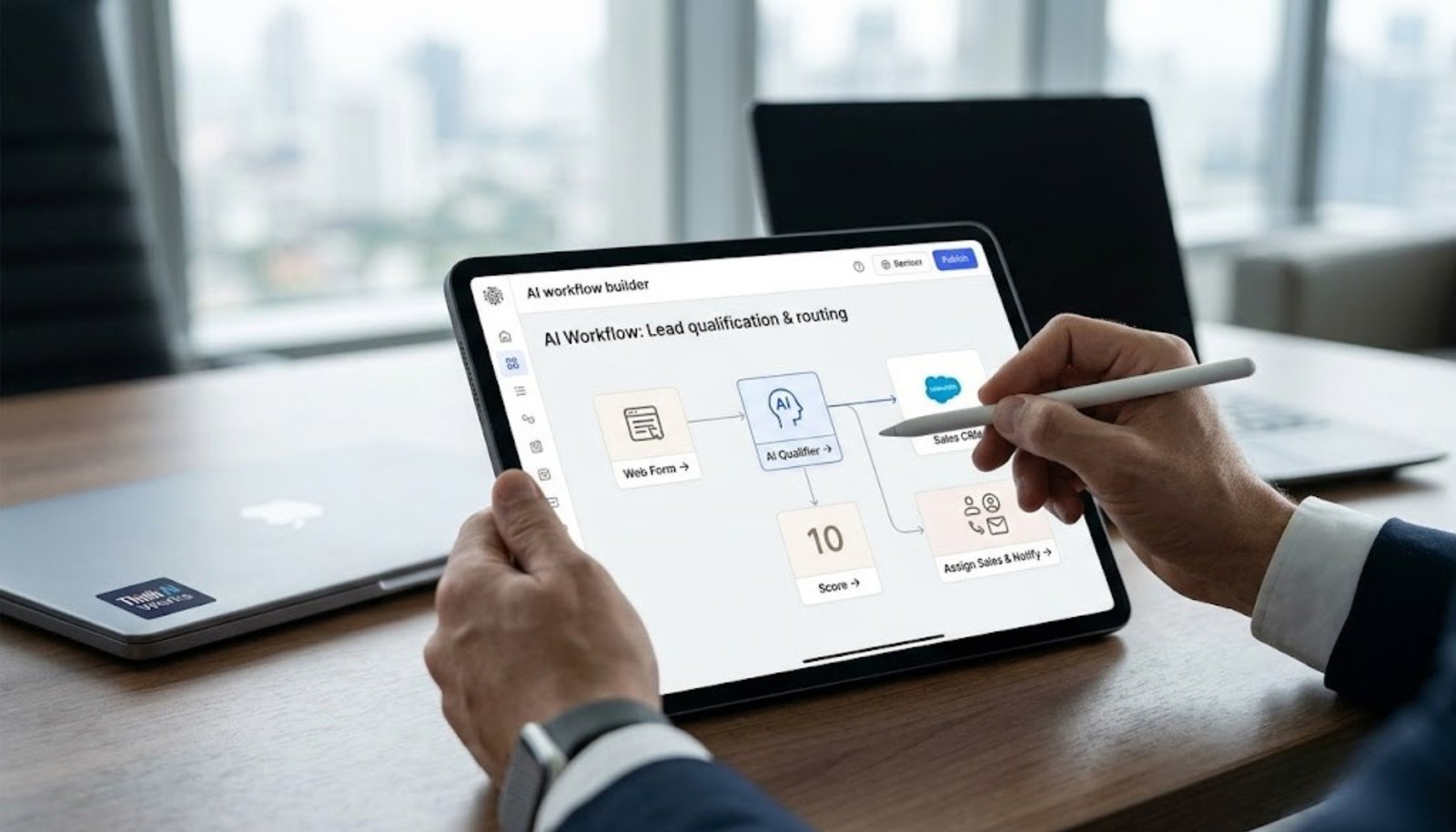
This is where things get interesting. AI workflow automation adds a layer of judgment on top of the trigger and action model. An AI agent can read an incoming message figure out intent pull the right record and decide the next step instead of just following a rigid path. It is not magic and it is not perfect but for anyone who has watched a support inbox pile up overnight the difference is real.
Think of it less like a rigid script and more like an AI assistant sitting inside your AI powered workflow deciding what happens next. Plenty of teams still are not sure how to use AI this way and that hesitation is usually what slows adoption down more than the technology itself.
No Code and Low Code Workflow Builders
Most of the tools on this list lean no code meaning you build a workflow by dragging and connecting blocks in a visual workflow builder rather than writing code. A low code platform sits a step up letting technical teams drop in custom scripts where the no code automation hits a wall. Neither approach is better across the board. It depends on who on your team will actually be maintaining the thing six months from now.
Most of these fall under no code workflow automation and the better platforms now ship with an AI workflow builder baked right in so the same canvas that lays out your steps can also suggest the next one.
How We Evaluated the Best AI Workflow Automation Tools
We looked at five things for every platform on this list. Real AI features versus marketing labels. Integration depth. Ease of setup. Pricing including whether a free plan actually lets you do something useful. And how the tool handles failure when a step breaks. A platform with strong AI decision making but a confusing interface still loses points here because automation only matters if someone on your team can actually use it without a two week onboarding call.
We also tested each tool on the same basic task. A lead capture form that needed to route to a CRM and trigger a follow up message. So the comparison is not just reading feature pages.
We paid close attention to workflow automation features that actually cut manual work and not just ones that look good in a demo and to how cleanly each platform handles multi step workflows end to end.
10 Best Workflow Automation Tools in 2026
Here is the short version before we get into each tool one by one. Each of these tools made the list because it does something the others do not and not because it showed up on every other roundup. These are the top AI workflow automation tools available right now ranging from simple business process automation tools to full custom builds.
| Tool | Best For | AI Features | Starting Price |
|---|---|---|---|
| Zapier | Beginners and simple automation | Basic AI steps. Natural language builder | Free plan. Paid from $19.99/mo |
| n8n | Self hosted flexibility | Custom AI agent nodes | Free self hosted. Cloud from $20/mo |
| Make | Visual complex workflows | AI assisted scenario building | Free plan. Paid from $9/mo |
| GoHighLevel | Agencies and client pipelines | AI conversation bots | From $97/mo |
| Power Automate | Microsoft heavy businesses | Copilot based AI steps | From $15/user/mo |
| Workato | Enterprise integration | Enterprise grade AI recipes | Custom pricing |
| Tray.ai | Building custom AI agents | Native AI builder | Custom pricing |
| Pipedream | Developers | Code plus AI in one flow | Free plan. Paid from $29/mo |
| ActivePieces | Open source alternative | Growing AI piece library | Free open source. Cloud from $17/mo |
| ThinkAIWorks Custom Builds | Businesses needing a workflow automation tool designed around their exact process | Fully custom AI agent deployment | Project based |
Zapier
Zapier is still the tool most people picture when they hear workflow automation software. It connects thousands of apps. The setup is genuinely simple. And the free plan is enough to test a real use case before you pay anything. The tradeoff is cost at scale. Once you are running a few thousand workflow executions a month the price climbs fast and some teams end up looking for alternatives to Zapier once they outgrow it. Plenty of small teams still use Zapier as their first pick and it remains one of the more approachable AI tools on the market for that reason.
n8n
If you want control n8n is the one to look at. It is open source. You can self host it. And the n8n workflow editor lets you mix no code blocks with actual code when you need it. The learning curve is steeper than Zapier so it is not the best fit for a non technical marketing team building their first automation.
Make
Make formerly Integromat is built for people who want to see the entire logic of a workflow laid out visually including branches and loops. It is one of the more capable AI workflow automation platforms for complex multi step processes though the interface can feel busy for a first time user. Teams that care about workflow design as much as raw function tend to gravitate here.
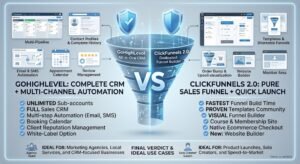
GoHighLevel
GoHighLevel is less a pure automation tool and more a full CRM with workflow automation built in which is why so many agencies use it to manage client pipelines funnel pages and follow up sequences in one place. If your business runs client campaigns and needs pipelines that talk to booking calendars and payment tools without stitching five apps together this is where GoHighLevel automation seKtup earns its keep.
Microsoft Power Automate
For any business already living inside Microsoft 365 Power Automate is the obvious pick. It connects natively to Outlook Teams and SharePoint and its Copilot integration handles a decent chunk of AI steps without leaving the Microsoft ecosystem. Outside of that ecosystem it feels less flexible than the competition.
Workato
Workato targets enterprise grade AI use cases where compliance and governance matter as much as the automation itself. It is not cheap and it is not built for a five person team but for a large company running dozens of interconnected workflows the reliability is worth the price tag.
Tray.ai
Tray.ai leans hard into deploying AI agents rather than simple trigger action flows. It is one of the few platforms built from the ground up as an AI builder meaning the AI is not bolted on as an afterthought. It is not a simple AI add on either. It is an AI workflow automation tool designed from day one around building agents. This makes it a strong pick for teams who see AI agents as the actual product and not a bonus feature.
Pipedream
Pipedream is the developer’s choice. You can write real code inline connect to any API and still keep parts of the flow no code. It is one of the more underrated AI workflow tools out there mostly because it never marketed itself as an AI product even though it handles AI models well. It connects to external tools through open APIs without locking you into one vendor’s ecosystem.
ActivePieces
ActivePieces is the open source challenger worth watching. It is free to self host. The community is active. And it is adding AI pieces at a steady pace. It is not as polished as Zapier or Make yet but for a budget conscious team comfortable with some rough edges it is a legitimate tool on this list.
ThinkAIWorks Custom AI Agent Builds
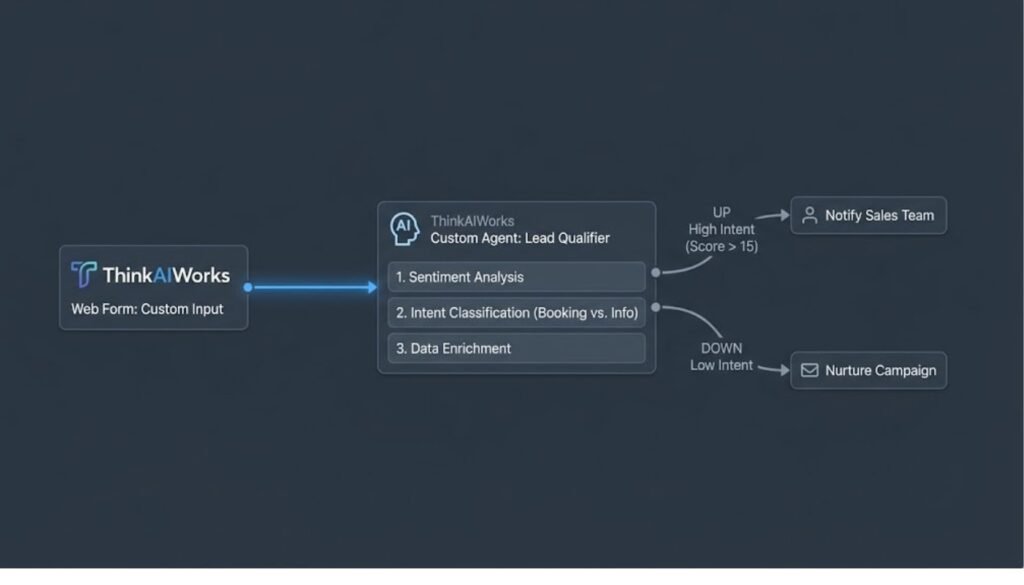
Every tool above works off pre built workflow templates you configure yourself. Sometimes that is not enough especially when a business needs an automation tool designed specifically around an existing process rather than the other way around. This is where a custom AI agent build like the ones ThinkAIWorks puts together for lead qualification WhatsApp booking flows or full AI lead generation sequences tends to outperform a generic platform because the AI agent is trained on your actual data and your actual customer conversations instead of a template.
Automation Platform Features Compared
Feature lists on vendor sites tend to blur together so here is a cleaner side by side of what actually matters day to day.
| Feature | Zapier | n8n | Make | GoHighLevel | Power Automate |
|---|---|---|---|---|---|
| AI agent support | Basic | Strong | Growing | Strong | Basic |
| Free plan | Yes | Yes (self hosted) | Yes | No | Limited |
| No code editor | Yes | Yes | Yes | Yes | Yes |
| Custom code steps | Limited | Full | Limited | No | Limited |
| Best for | Simplicity | Flexibility | Visual logic | Client pipelines | Microsoft users |
The pattern worth noticing here is that advanced workflow needs almost always trade off against ease of use. The tools with the deepest automation platform capabilities ask more of the person building the workflow. There is no shortcut around that.
Best Workflow Automation Tools by Use Case
Picking a tool without a specific use case in mind is how teams end up paying for features they never touch. Match the tool to the job first.
Best for Marketing Workflow Automation
Marketing teams sending sequences scoring leads and syncing ad platforms tend to do best with Make or Zapier since both integrate cleanly with the major ad and email tools without needing a developer involved. A marketing workflow that routes a Meta ad lead straight into a qualification bot is a good example of automated workflows done right.
Best for Sales and Lead Routing
For sales teams GoHighLevel or a custom build usually wins because pipeline logic gets complicated fast with different rules for different lead sources. Rather than leaning on a pre made workflow inside a generic process automation platform most sales teams end up customizing pipeline stages heavily anyway. This is a case where building a sales automation workflow from scratch built around your actual sales stages beats forcing a generic CRM template to fit.
Best for Customer Support and AI Agent Handoff
Support teams benefit most from tools with strong AI agent handling since the goal is answering common questions instantly and escalating only what genuinely needs a human. An AI chatbot for business deployed across WhatsApp or a website can absorb a large share of repeat questions before a support rep ever sees the conversation.
Best for Ecommerce Order and Fulfillment Automation
Ecommerce businesses have their own set of headaches mostly around abandoned carts and order status updates. A tool like Make or a purpose built setup for Shopify automation can recover a meaningful chunk of abandoned checkouts automatically without a person ever touching the email. Ecommerce is one corner of the automation space where smart process automation pays for itself fast mostly through recovered revenue nobody had to chase manually.
How to Choose Automation Software
There is no single best fit here only the best fit for your team right now. Run through this before you commit to anything.
List the integrations you actually need and not the ones you might need someday. Decide how much AI maturity your use case genuinely requires versus what sounds impressive in a demo. Be honest about your team’s technical skill since a no code platform beats a low code platform if nobody on staff can debug a script. Set a real budget including the cost per workflow execution and not just the monthly subscription. Check how the tool behaves when a step fails because it will fail eventually. And if your process is genuinely unique get a quote for a custom workflow build before assuming a template tool will stretch to fit.
AI Automation Workflow Examples in Practice
Seeing this in action helps more than any feature list. Here are two real patterns.
A lead comes in through a Meta ad. An AI automation workflow captures it. Checks it against existing tools like a CRM for duplicates. Then routes it into a WhatsApp qualification bot that asks two or three screening questions before a human ever gets involved. This is a straightforward case of an AI agent doing the first touch work so a sales rep only spends time on leads worth their time.
A support ticket comes in. Instead of sitting in a queue an AI agent reads the message checks it against a knowledge base and either answers directly using generative AI or tags it for a human with full context attached. Some businesses now run several AI agents within a single pipeline.
One handling triage and another handling follow up. And the addition of AI at each stage means the system is reading and sorting data on its own instead of forcing a person to read every message by hand. Businesses adopting AI this way are not replacing their support team. They are removing the repetitive 80 percent of tickets so the team can focus on the 20 percent that actually needs a person.
One thing most comparison articles skip. The real cost of automation is not the software fee. It is the maintenance. A workflow built once and never checked again tends to quietly break within two to three months as connected apps update their APIs. Budget time for review and not just setup.
How Think AI Works Solves the Lead Follow-Up Problem
Most businesses that come to us aren’t missing leads. They’re missing the system that catches them. A lead comes in through a form, an ad, or a WhatsApp message, and it sits in an inbox until someone has a free minute. By then the moment’s gone.
We build the automated lead follow-up system around wherever your leads actually come from, not just one channel. That means the trigger fires the second a lead enters your CRM, whether that lead started on a landing page, a Meta ad, or a WhatsApp conversation.
Instant Response Without Adding Headcount
You don’t need a bigger sales team to follow up faster. You need the first message to go out automatically, then a person to step in once someone actually replies. That’s the balance we build every workflow around.
One Pipeline, Every Lead Source Connected
If leads come in through five different channels and land in five different places, half of them get missed by default. We pull every source into one pipeline through our GoHighLevel automation setup, so nothing depends on someone remembering to check a second inbox.
Follow-Up That Adapts to Each Lead
Not every lead should get the same sequence. A warm lead ready to book and a cold one that just downloaded a guide need different messages at different speeds. We build the logic so the system tells the difference, using lead scoring to decide who gets a fast direct offer and who goes into a longer nurture track.
Why Choose Think AI Works for Lead Follow-Up Automation
Plenty of agencies will set up a follow-up email and call it automation. We build the full loop, capture, trigger, sequence, and handoff, so nothing depends on a person remembering a step.
What we bring that’s harder to copy is the combination. We’re not just a CRM reseller and we’re not just a chatbot shop. We connect lead capture, WhatsApp and email follow-up, AI-assisted scoring, and CRM workflows into one system, which means fewer handoffs between tools and fewer places for a lead to get lost.
We also don’t hand you a finished automation and disappear. Sequences get reviewed and adjusted based on what’s actually converting, not left running on autopilot from day one. That ongoing part is where most DIY setups fall behind, since a sequence built once in January rarely still fits how leads behave by summer.
Benefits of Working With Think AI Works
The real value isn’t the automation itself, it’s what stops happening once it’s running.
- Leads stop sitting unanswered overnight or over a weekend, since the first message goes out the moment they come in.
- Your sales team spends time on leads that are actually engaged instead of working through a list in order.
- Follow-up stays consistent even during busy weeks, so nothing slips just because someone was slammed with other work.
- Reporting shows which messages in the sequence are actually landing, so the follow-up system gets better over time instead of staying static.
- You get one pipeline instead of leads scattered across email, WhatsApp, and ad platform inboxes.
Each of these ties back to the same problem this article opened with. A lead that goes cold overnight isn’t a sales problem, it’s a system problem, and that’s the part we’re built to fix.
Case Study: Fixing a Broken Follow-Up Process
The problem. A client running lead generation through Meta ads and a website form was losing a noticeable share of leads simply because responses depended on whoever was free that day. Leads that came in after hours or over the weekend often didn’t get a reply until the following business day, by which point several had already gone with a competitor.
The approach. We mapped every point a lead could enter the business, the ad form, the website, and WhatsApp enquiries, into a single CRM pipeline. From there we built an automated follow-up sequence that fired an instant confirmation message, followed by a short value message within a day, and a direct offer if there was still no reply after that.
The solution. Lead scoring was added so replies showing real intent got routed straight to the sales team, while lower intent leads moved into a longer nurture sequence instead of getting dropped entirely. Nothing sat waiting on a person to notice it.
Let’s take the busywork off your plate.
Book a free 30-minute call and we’ll map out exactly where automation can save you hours every week — no pressure, no jargon.
FAQs About workflow automation platform comparison
u003cstrongu003eWhat is the best workflow automation tool in 2026?u003c/strongu003e
There is no single winner. Zapier is the best entry point for beginners. n8n is the best for teams that want full control. And a custom build is the best option when your process does not fit a template.
u003cstrongu003eWhat is the difference between workflow automation and AI workflow automation?u003c/strongu003e
Standard workflow automation follows fixed rules with no judgment involved. AI workflow automation adds decision making so the system can interpret context and choose the next step instead of just following a rigid path.
u003cstrongu003eIs Zapier still worth using in 2026?u003c/strongu003e
Yes especially for simple automation and quick setup. It becomes less cost effective once your workflow executions scale into the thousands per month which is when teams start comparing tools like Slack integrations or n8n instead.
u003cstrongu003eWhat is the cheapest workflow automation software with a free plan?u003c/strongu003e
Zapier Make and n8n all offer usable free plans. n8n’s self hosted option is the most generous since there is no execution cap when you run it on your own server.
u003cstrongu003eCan AI agents replace traditional automation workflows?u003c/strongu003e
Not entirely. Standard workflow automation is still more reliable for tasks with a fixed predictable path. AI agents add value in situations that require judgment like reading intent in a message or handling an edge case a rule based flow was not built for.
u003cstrongu003eWhat is robotic process automation compared to workflow automation?u003c/strongu003e
Robotic process automation mimics human clicks inside software which makes it useful for older systems without APIs. Regular workflow automation connects through APIs directly which tends to be faster and more stable.
u003cstrongu003eHow do I choose the right automation platform for my business?u003c/strongu003e
Start with your integrations your team’s technical comfort level and your budget including per execution costs then test the shortlisted tools on one real workflow before committing.
u003cstrongu003eWhat is n8n and how does it compare to Zapier?u003c/strongu003e
n8n is an open source workflow automation platform that can be self hosted for free while Zapier is a fully hosted simpler tool with an easier learning curve. n8n suits technical teams. Zapier suits everyone else.
u003cstrongu003eDo I need a no code platform or a developer first tool?u003c/strongu003e
If nobody on your team writes code stick to a no code platform like Zapier or Make. If you have a developer who can maintain custom scripts a tool like Pipedream or n8n will give you more room to grow.
u003cstrongu003eWhat industries benefit most from AI workflow automation?u003c/strongu003e
Real estate ecommerce restaurants and any business with high inbound lead volume see the fastest returns mainly because instant response speed directly affects conversion in those industries.
u003cstrongu003eHow much does business process automation software typically cost?u003c/strongu003e
Entry level tools start free or under $20 a month. Enterprise grade AI platforms like Workato run into custom pricing that can reach thousands monthly depending on volume and custom builds are typically quoted per project.
u003cstrongu003eCan I automate WhatsApp and LinkedIn outreach with these tools?u003c/strongu003e
Some platforms connect to WhatsApp and LinkedIn through official APIs though many require a dedicated setup similar to WhatsApp automation or LinkedIn automation built specifically for those channels since general purpose platforms often hit rate limits or platform restrictions.
Final Take: Choosing Your 2026 Workflow Automation Stack
There is no universal answer to which platform wins. This list of workflow automation tools for 2026 will keep shifting as AI features mature so it is worth revisiting your stack every year rather than assuming today’s pick is permanent. Zapier and Make cover most small teams fine.
n8n and Pipedream suit anyone with a developer on staff. GoHighLevel fits agencies running client pipelines. And when none of the standard tools fit the process you actually run a workflow automation tool built around your business and not the other way around is usually the better long term call.
If you are still stitching things together manually or fighting a template that almost works talk to our automation team about what a custom setup would look like for your business.
Sources: zapier.com n8n.io gartner.com mckinsey.com