Table of Contents
I had a client last year who built out a whole lead qualification workflow in Make and it worked great for months. Then they wanted to add an AI agent step that could actually read a message and decide what to do next based on context, not just a fixed if this then that rule. Make could not really do that the way they wanted. That is usually the exact moment n8n vs make starts showing up in someone’s search history.
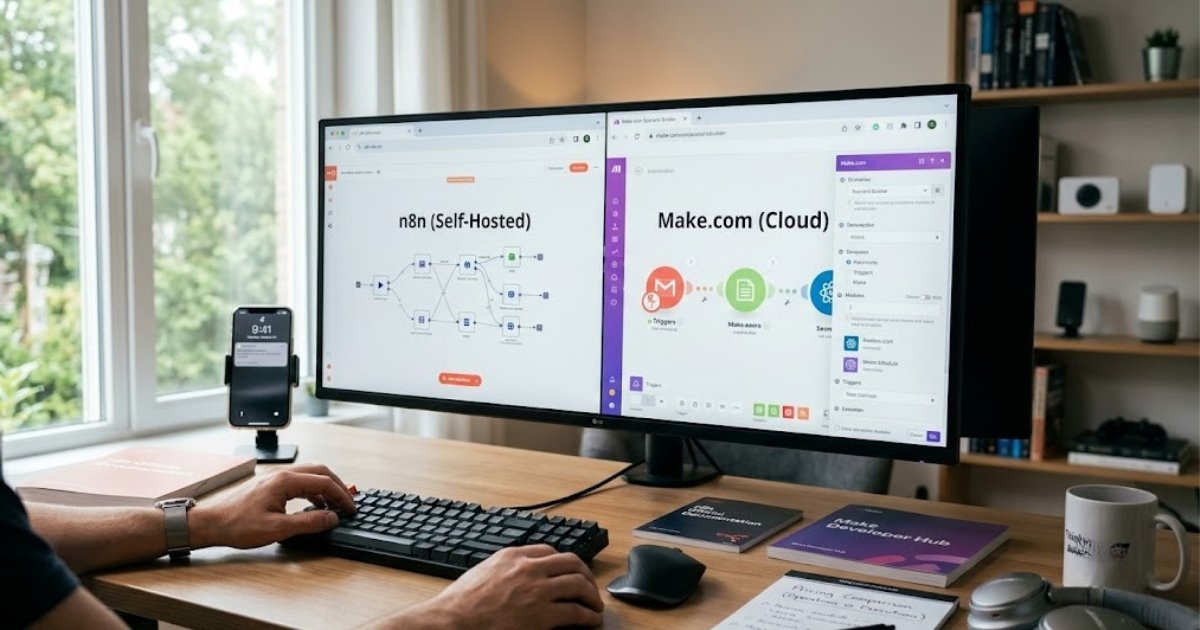
This piece breaks down n8n vs make pricing, how each platform handles ai agent building, what a node actually is versus a module, and when self hosting n8n makes sense over staying on Make’s cloud. By the end you will know whether n8n or make fits your workflow automation needs better, and where Zapier still fits into the picture. If you would rather have someone else wire all this up, we build and host both n8n and Make workflows for clients running GoHighLevel pipelines and AI chatbot setups every week.
What Is n8n vs Make.com
n8n is an open-source workflow automation platform you can run in the cloud or host on your own server, built around a canvas where you connect nodes. Make.com, formerly Integromat, is a cloud based automation tool built around scenarios made of modules, with no self hosting option at all. So make.com vs n8n really comes down to one core question. Do you want a fully managed SaaS tool or do you want the option to run things yourself.
n8n vs Make Pricing Breakdown
How Make.com Execution Pricing Works
Make.com execution pricing runs on something called operations, and every single module that fires inside a scenario uses up one operation. A scenario with six modules that runs a thousand times a month burns through six thousand operations, not a thousand. Make’s pricing tiers jump once you cross a few hundred thousand operations a month, and for a lot of people that number sneaks up faster than expected.
How n8n Pricing Works
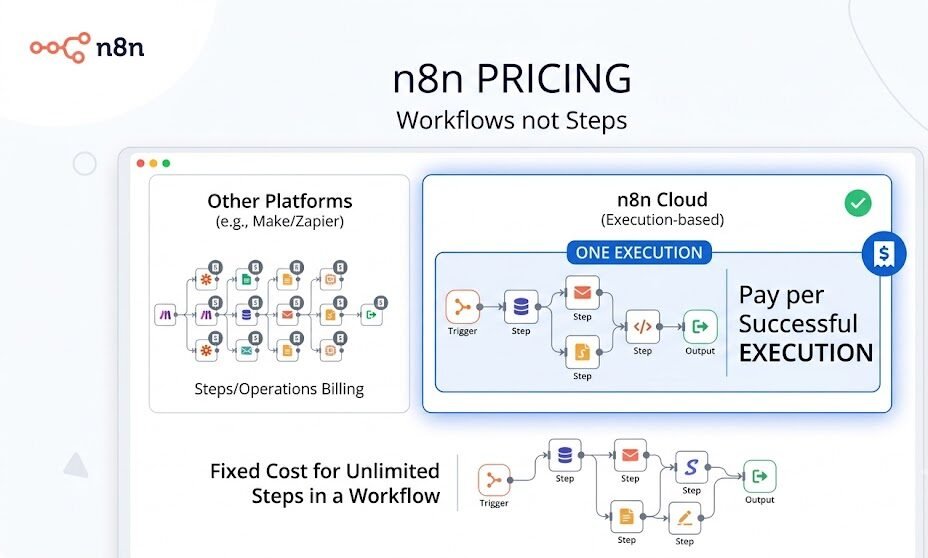
n8n charges based on workflow executions instead of individual steps, which is a big difference once your workflows get more than two or three steps long. n8n cloud uses this execution model too, but if you self host n8n on your own server, you are not billed per execution at all. You are just paying for hosting.
Cost Comparison Table at Scale
Here is a rough monthly cost for a business running around fifteen thousand automation runs with moderately complex workflows.
| Platform | Pricing model | Rough monthly cost |
|---|---|---|
| Make.com | Per operation, every module counts | 200 to 450 dollars |
| n8n Cloud | Per execution, not per step | 60 to 140 dollars |
| n8n Self Hosted | Flat server cost | 15 to 40 dollars in hosting |
This is not a knock on Make. Its pricing structure is genuinely predictable for simple scenarios, and a predictable pricing model matters a lot if you are budgeting month to month and do not want surprises.
n8n vs Make for AI Agents
Building AI Agents in n8n
n8n lets you build workflows around actual AI agent nodes, meaning you can wire up memory, tool access, and multi step reasoning where the automation makes a real decision instead of just following one fixed path. If you are picking an ai model and want fine control over how it thinks through a task, n8n gives you far more room to shape that logic than Make does right now.
AI Modules in Make.com
Make offers a solid set of pre-built AI app connectors for things like OpenAI or Claude, and honestly for a lot of simple ai workflow needs that is plenty. You can drop a module in, connect your prompt, and move on. What Make does not offer yet is the same depth of agent orchestration n8n provides, so if you’re chasing something closer to a true AI agent with memory and follow up actions, n8n wins here.
Node vs Module: How n8n and Make.com Structure Workflows
A node in n8n is one step on a visual canvas, and n8n nodes chain together left to right, each one a component within the n8n ecosystem that can transform, filter, or send data. Make calls the same basic idea a module, and modules sit inside a scenario rather than a workflow. Both use a drag-and-drop interface, so visually they feel similar at first glance.
The real difference shows up in the builder itself. n8n’s ui exposes more raw data at each step, which power users tend to like because you can see exactly what is passing between nodes. Make’s ui hides more of that complexity by default, which is part of why people call it more approachable for a first automation.
Self Hosting n8n vs Make.com’s Cloud Only Model
What Self Hosting n8n Involves
Since n8n is an open-source project, you can self host n8n on a small cloud server or your own on premise machine. Running your own n8n instance means full control over data storage and no per execution billing once it is set up, though someone on your team does need to keep it updated.
Using n8n this way is popular with teams that already run their own infrastructure or work in industries where customer data cannot leave a specific server. n8n for enterprise deployments often goes this route specifically for that reason.
Why Make.com Has No Self Hosted Option
Make.com and n8n differ here in a pretty simple way. Make is a SaaS product from the ground up, so there is no self hosted version and there likely never will be. If you are searching for an open source automation tool because of data residency rules or a shrinking budget, n8n is really the only one of the two that answers that need directly.
A few real reasons teams end up choosing n8n specifically for self hosting:
- They need customer data to stay inside their own infrastructure for compliance reasons.
- Their operation count on Make has made the monthly bill hard to justify.
- They want custom code for n8n nodes that no public integration covers.
- They already pay for servers anyway and would rather run one more service than keep scaling a SaaS bill.
This is exactly the kind of setup our team handles for clients moving off a pure SaaS stack, whether that is hosting an n8n instance for a real estate lead pipeline or wiring AI chatbot automation into an existing WhatsApp setup.
n8n vs Make vs Zapier: Where Zapier Fits
You cannot really finish an n8n vs make comparison without Zapier coming up too. Zapier connects the widest range of apps out of the box and charges per task rather than per operation or execution, which is its own pricing headache once workflows get complex. Unlike n8n, Zapier offers no self hosting at all, same as Make. Like n8n, Make gives you a visual scenario builder, but neither one can be self hosted the way n8n can. Whereas n8n leans toward developers and technical teams, both Make and Zapier lean toward speed and simplicity for non technical users.
Ease of Use: Learning Curve and User Experience
If you want something running today with zero technical background, make is easier to pick up than n8n, plain and simple. Its module based scenario builder holds your hand more, and the learning curve is genuinely gentler for someone building their first automation.
n8n typically takes longer to feel comfortable in, maybe a week or two of regular use before it clicks. But here’s the thing, once it clicks, power users tend to move faster in n8n than they ever did in Make, because the extra visibility into data and the code node option let you skip workarounds entirely. Error handling is also more transparent in n8n. You can see exactly which node failed and why, where Make sometimes buries that detail a layer deeper.
n8n or Make for Your Use Case
Neither tool wins outright. It depends on what you are actually building and who on your team will maintain it.
| Situation | Better fit |
|---|---|
| Simple automations, one or two steps, no developer needed | Make |
| Complex workflows with branching logic and custom code | n8n |
| Building real AI agents with memory and tool use | n8n |
| Fast setup, non technical team, predictable monthly bill | Make |
| Data privacy requirements or custom integrations | n8n self hosted |
Start with make if your team just needs automations without a steep setup curve, and revisit the choice once your scenarios start getting complicated. Choose n8n from day one if you already know you need to build complex workflows or connect an ai agent into the mix. Choosing between make and n8n honestly gets a lot clearer once you write down your actual use case instead of guessing at future needs.
Integrations: Pre Built Apps and API Access
Make provides a large library of pre-built app modules, and for common tools like Gmail, Slack, or Shopify you are rarely missing an integration. n8n provides a smaller official node list but makes up ground fast with generic HTTP and API request nodes, so n8n and make.com both let you reach outside their native app list, just through different paths.
n8n and make users both run into the same situation eventually, needing to connect some obscure internal tool with an API that has no dedicated integration. Make lets you handle this through a generic HTTP module, and n8n lets you do the same with its HTTP request node plus more flexibility to transform the response with actual code if needed.
Final Verdict: n8n vs Make.com in 2026
There is no universal winner, and I would be lying if I said there was. Make is a genuinely cost-effective, user-friendly automation platform built for developers is actually the wrong way to describe it, since Make is built for speed and non technical users first. n8n is the automation platform built for developers and technical teams who want to build complex workflows, run real ai agent logic, and keep full control through self hosting. Both are solid, and a lot of businesses we work with end up using both for different parts of their stack.
If you are still weighing n8n vs make for your specific setup, start by mapping out your actual workflow complexity and your team’s comfort with a bit of a learning curve. That answer will tell you more than any single comparison.
Need help picking or setting either of these up. ThinkAIWorks builds automation for GoHighLevel pipelines, AI lead generation, and WhatsApp business automation, and we can walk you through whether n8n or Make fits your exact use case on one call.
How Think AI Works Solves the Lead Follow-Up Problem
Most businesses that come to us aren’t missing leads. They’re missing the system that catches them. A lead comes in through a form, an ad, or a WhatsApp message, and it sits in an inbox until someone has a free minute. By then the moment’s gone.
We build the automated lead follow-up system around wherever your leads actually come from, not just one channel. That means the trigger fires the second a lead enters your CRM, whether that lead started on a landing page, a Meta ad, or a WhatsApp conversation.
Instant Response Without Adding Headcount
You don’t need a bigger sales team to follow up faster. You need the first message to go out automatically, then a person to step in once someone actually replies. That’s the balance we build every workflow around.
One Pipeline, Every Lead Source Connected
If leads come in through five different channels and land in five different places, half of them get missed by default. We pull every source into one pipeline through our GoHighLevel automation setup, so nothing depends on someone remembering to check a second inbox.
Follow-Up That Adapts to Each Lead
Not every lead should get the same sequence. A warm lead ready to book and a cold one that just downloaded a guide need different messages at different speeds. We build the logic so the system tells the difference, using lead scoring to decide who gets a fast direct offer and who goes into a longer nurture track.
Why Choose Think AI Works for Lead Follow-Up Automation
Plenty of agencies will set up a follow-up email and call it automation. We build the full loop, capture, trigger, sequence, and handoff, so nothing depends on a person remembering a step.
What we bring that’s harder to copy is the combination. We’re not just a CRM reseller and we’re not just a chatbot shop. We connect lead capture, WhatsApp and email follow-up, AI-assisted scoring, and CRM workflows into one system, which means fewer handoffs between tools and fewer places for a lead to get lost.
We also don’t hand you a finished automation and disappear. Sequences get reviewed and adjusted based on what’s actually converting, not left running on autopilot from day one. That ongoing part is where most DIY setups fall behind, since a sequence built once in January rarely still fits how leads behave by summer.
Benefits of Working With Think AI Works
The real value isn’t the automation itself, it’s what stops happening once it’s running.
- Leads stop sitting unanswered overnight or over a weekend, since the first message goes out the moment they come in.
- Your sales team spends time on leads that are actually engaged instead of working through a list in order.
- Follow-up stays consistent even during busy weeks, so nothing slips just because someone was slammed with other work.
- Reporting shows which messages in the sequence are actually landing, so the follow-up system gets better over time instead of staying static.
- You get one pipeline instead of leads scattered across email, WhatsApp, and ad platform inboxes.
Each of these ties back to the same problem this article opened with. A lead that goes cold overnight isn’t a sales problem, it’s a system problem, and that’s the part we’re built to fix.
Case Study: Fixing a Broken Follow-Up Process
The problem. A client running lead generation through Meta ads and a website form was losing a noticeable share of leads simply because responses depended on whoever was free that day. Leads that came in after hours or over the weekend often didn’t get a reply until the following business day, by which point several had already gone with a competitor.
The approach. We mapped every point a lead could enter the business, the ad form, the website, and WhatsApp enquiries, into a single CRM pipeline. From there we built an automated follow-up sequence that fired an instant confirmation message, followed by a short value message within a day, and a direct offer if there was still no reply after that.
The solution. Lead scoring was added so replies showing real intent got routed straight to the sales team, while lower intent leads moved into a longer nurture sequence instead of getting dropped entirely. Nothing sat waiting on a person to notice it.
Let’s take the busywork off your plate.
Book a free 30-minute call and we’ll map out exactly where automation can save you hours every week — no pressure, no jargon.
Frequently Asked Questions
u003cstrongu003eIs n8n better than Make.com?u003c/strongu003e
It depends on your use case. n8n is better for complex workflows, AI agents, and self hosting. Make.com is better for fast, simple automations without a steep learning curve.
u003cstrongu003eIs n8n open source?u003c/strongu003e
Yes. n8n is an open-source automation platform, meaning you can self host it for free and only pay for the server it runs on, or use n8n cloud instead.
u003cstrongu003eHow does Make.com execution pricing work?u003c/strongu003e
Make charges per operation, and every module in a scenario counts as one operation each time it runs. Complex scenarios with several modules use up operations fast.
u003cstrongu003eCan I self-host n8n for free?u003c/strongu003e
Yes. Self-hosting n8n costs nothing in software fees. You only pay for your own server and the time it takes to maintain it.
u003cstrongu003eWhich is better for AI agents, n8n or Make?u003c/strongu003e
n8n is generally better for building true AI agents with memory and multi step reasoning. Make offers pre-built AI modules that work well for simpler ai workflow tasks.
u003cstrongu003eIs Make.com easier to learn than n8n?u003c/strongu003e
Yes, for most beginners. Make’s drag-and-drop interface and module system have a gentler learning curve, while n8n takes more time to master but offers more control once you do.
u003cstrongu003eWhat is the difference between a node and a module?u003c/strongu003e
A node is n8n’s term for one step in a workflow. A module is Make’s term for the same basic idea inside a scenario. Both function similarly but sit inside different builder environments.
u003cstrongu003eDoes Make.com offer a self-hosted version?u003c/strongu003e
No. Make.com is a SaaS product only, with no self hosted option, which is a key reason people search for an open source automation tool and find n8n instead.
u003cstrongu003eIs n8n good for developers?u003c/strongu003e
Yes. n8n includes code nodes for JavaScript and Python, full API access, and enough flexibility that many teams describe it as an automation platform built for developers specifically.
u003cstrongu003eCan Make.com and n8n be used together?u003c/strongu003e
Yes, some teams run both, using Make for simple automations without much setup and n8n for complex workflows or AI agent builds where more control is needed.
u003cstrongu003eWhat is an open source automation tool?u003c/strongu003e
An open source automation tool is software you can inspect, modify, and self host on your own server instead of relying only on a vendor’s cloud. n8n is the clearest example in this comparison.
u003cstrongu003eHow much does n8n cost at scale?u003c/strongu003e
n8n cloud pricing scales with executions, usually landing well below Make.com’s operation based cost at the same volume. Self hosted n8n can cost as little as your server bill.
u003cstrongu003eIs n8n or Make better for small business?u003c/strongu003e
For a small business running simple automations without much setup, Make is usually the better choice. Once workflows grow more complex, n8n tends to make more financial sense.
u003cstrongu003eDoes n8n support custom API integrations?u003c/strongu003e
Yes. n8n supports generic HTTP request nodes and custom code, so you can connect almost any tool with an API even without an official integration.
u003cstrongu003eWhich tool has more pre-built integrations, n8n or Make?u003c/strongu003e
Make.com has a larger official pre-built module library. n8n has fewer native integrations but compensates with more flexible API and code based connections.
Sources and further reading: n8n official documentation and pricing page, official Make developer hub and pricing page, G2 comparison reviews for workflow automation software.