
Table of Contents
Most businesses lose customers not because their product is bad but because nobody answers WhatsApp fast enough. A lead messages at 9pm asking about pricing and by the time someone replies the next morning that person has already messaged three competitors. This is exactly why so many teams are moving to build a whatsapp chatbot instead of relying on a person to sit and reply all day.
A whatsapp chatbot for business is basically a program connected to your WhatsApp number that answers questions handles bookings and qualifies leads without a human typing every reply. Some are simple and follow a script. Others run on ai and actually understand what someone is asking even if they phrase it in a weird way.
By the end of this guide you will know the difference between a whatsapp business app a whatsapp business api and a meta business agent plus how to actually set one up from scratch. If building it yourself feels like too much on top of everything else running a business already demands ThinkAIWorks handles whatsapp automation for companies that would rather have it built for them than spend a weekend figuring out webhooks.
What Is a WhatsApp Chatbot for Business
A whatsapp chatbot for business is software that sits on your WhatsApp number and handles the reply automatically instead of a staff member doing it. When a customer sends a message the bot reads it matches it to a flow or an ai model and sends back an answer usually within seconds.
That’s the short version. Here’s the part people miss though. Not every chatbot on whatsapp works the same way. Some are just glorified auto replies that repeat the same three answers over and over. Others are connected to a proper ai chatbot engine and can hold an actual back and forth conversation. If you’ve ever messaged a business using whatsapp and gotten an instant answer to something specific like store hours or order status that’s the chatbot doing its job quietly in the background. Companies that offer an ai chatbot for business usually build this exact kind of setup so it feels less like a robot and more like a quick reply from a real person.
AI Chatbot vs Rule-Based Chatbot vs AI Agent on WhatsApp
The terms get thrown around loosely and honestly it causes a lot of confusion for anyone trying to buy or build one. Here’s the real difference broken down plainly.
| Type | How it works | Good for |
|---|---|---|
| Rule-based chatbot | Follows fixed menus and keyword triggers | Simple FAQs and store hours |
| AI chatbot | Understands natural language and varies its ai replies | Support questions phrased differently each time |
| AI agent | Can take actions like booking or checking order status not just chat | Lead qualification and task completion |
A rule based chatbot is fine if your questions never change. Type 1 for hours type 2 for location and so on. But the second a customer types something outside that script it breaks and just repeats itself which is honestly annoying for the person on the other end.
An ai chatbot with real ai capabilities handles that better because it reads intent not just keywords. And an ai agent goes one step further. It doesn’t just reply. It can actually do something like pull up an order or book a slot on your calendar. Advanced ai setups blend all three depending on the message so simple stuff gets a fast scripted reply and anything complex gets routed to the smarter model.
WhatsApp Business App vs WhatsApp Business API vs Meta Business Agent
This is where most people get stuck early on so let’s clear it up fast.
| Option | Best for | Chatbot support |
|---|---|---|
| WhatsApp Business App | Solo owners and very small teams | Very limited basic replies |
| Official WhatsApp Business API | Growing businesses needing automation | Full support for bots and integrations |
| Meta Business Agent | Businesses using Meta’s own AI tooling | Built on Meta’s official platform |
What Is the Official WhatsApp Business API
The whatsapp business api is the official whatsapp business api Meta provides for companies that need more than the free app allows. It’s not an app you download. It’s a connection that lets a chatbot platform or your own developer plug into WhatsApp directly. This is what powers a proper whatsapp business api integration where messages flow through a system instead of a phone.
What Is a Meta Business Agent
A meta business agent is Meta’s own way of running an ai chatbot inside the official ecosystem tied to your meta business account. It sits under your meta business manager so everything from ad accounts to your whatsapp business account lives in one place. Some businesses like keeping it all under one meta business umbrella rather than juggling three separate logins.
Creating a WhatsApp Chatbot for Business Starts With Your Meta Account
Before touching any chatbot platform you need the account side sorted. Creating a whatsapp chatbot without a proper meta business account first is basically starting a house without a foundation.
You’ll need a meta business account set up inside business manager. From there you connect or create your whatsapp business account and go through business verification. This business verification process can take anywhere from a day to about two weeks depending on your country and how complete your documents are. It’s genuinely one of the more tedious parts and I’ve seen businesses get stuck for weeks over a mismatched business name on their registration paperwork.
How to Build a WhatsApp Chatbot: Step-by-Step Guide
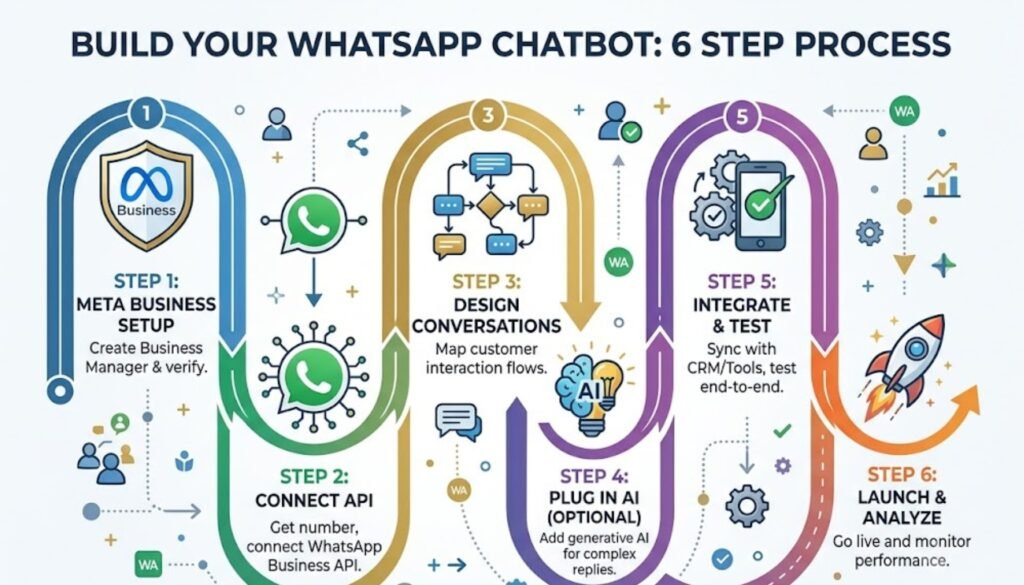
Here’s the actual process laid out in order. None of these steps are optional if you want something that works properly and not just a demo.
Step 1: Set Up Your Meta Business Account and Complete Business Verification
Create your meta business account log into business manager and start the verification. Have your business registration documents ready before you begin because the form will ask for them immediately.
Step 2: Connect the WhatsApp Business API or WhatsApp Business App
Decide if you need the whatsapp business app for basic use or the whatsapp api for anything with automation. Most businesses planning to build a whatsapp chatbot go straight for the api since the app alone won’t support a real bot.
Step 3: Choose a Chatbot Platform
Pick a chatbot platform that fits your budget and technical comfort. Some let you set up a chatbot in an afternoon with no code at all while others need a developer for the whatsapp business api setup.
Step 4: Design Conversation Flows Using WhatsApp Flows
Whatsapp flows let you build structured screens inside the chat itself think forms menus and booking steps instead of just plain text back and forth. This is where most of your chatbot conversations actually get shaped so take your time here.
Step 5: Add AI or Generative AI for Natural Replies
If you want the bot to handle open ended questions plug in generative ai so it isn’t limited to a fixed script. This is what makes conversations with ai feel less robotic and more like chatting with someone who actually read the message.
Step 6: Connect Your WhatsApp Number Test and Launch
Once everything is built connect your whatsapp number test every flow with a real phone and only then go live. Skipping the test step is how businesses end up with a bot that greets customers in the wrong language or gets stuck in a loop.
Building all six steps properly usually takes longer than people expect. If you’d rather skip the trial and error ThinkAIWorks builds whatsapp chatbots for businesses that want it running correctly the first time instead of after three rounds of fixing.
Best WhatsApp Chatbot Platforms and No Code Chatbot Builders
You don’t need to be a developer to launch one anymore. Plenty of chatbot builder tools now offer a whatsapp bot no code setup where you drag blocks together instead of writing anything.
Most platforms offer free options to start. A free plan usually caps how many conversations you get each month and a free tier might limit features like flows or ai replies until you upgrade. A few even offer free app access for very small message volumes which is honestly plenty for a business just starting out. The best whatsapp chatbot platforms balance ease of setup with real ai capabilities instead of forcing you to choose one or the other.
WhatsApp AI Chatbot Examples by Use Case
Every business needs something slightly different from a bot. A restaurant taking reservations needs different logic than a courier company confirming a delivery window. Here’s how it plays out across a few industries.
Ecommerce brands run whatsapp integration for order status abandoned cart nudges and shipping updates. If you’re running a Shopify store ThinkAIWorks’ ecommerce and Shopify automation covers exactly this kind of chatbot conversation.
Real estate teams use it for lead qualification asking budget and location before a human ever calls back. That’s the same approach ThinkAIWorks takes with real estate automation built to sort serious buyers from casual browsers.
Restaurants lean on whatsapp for customer support style bots handling bookings and sending review requests after a visit. Every whatsapp chatbot built for a restaurant tends to focus heavily on this booking flow since that’s where most of the messages land.
Logistics and courier businesses use chatbot automation for delivery updates so customers stop calling to ask where their package is. And sales teams running an ai lead generation setup often connect whatsapp qualification directly into their outreach so a warm lead gets a reply within minutes not hours.
There’s no single unique business formula that works everywhere. Business chatbots get built around whatever the actual chatbot needs are for that specific industry and that’s the part a lot of generic bot templates get wrong.
WhatsApp AI Chatbot GPT: How Generative AI Changes the Conversation
A whatsapp ai chatbot gpt setup uses a language model behind the scenes instead of a fixed decision tree. That means ai on whatsapp can now handle a question phrased five different ways and still land on the right answer.
This is different from older tools like Lyro AI which are built as closed systems tied to one specific platform. An open whatsapp business api setup lets you plug in whichever ai platform you prefer instead of being locked into one vendor’s version of a build a chatbot experience.
When to Automate vs When to Escalate to a Human Agent
Automation is great until it isn’t. A refund dispute or an angry customer typing in all caps needs a human agent not a scripted reply pretending to understand.
Good automate rules hand off complex or emotional messages immediately. Most businesses connect their bot to a crm so conversation history follows the customer instead of starting from zero when a person picks it up. Customer support built this way keeps automation for the repetitive stuff and people for everything that actually needs judgment.
WhatsApp Chatbot Pricing: What It Actually Costs
Whatsapp pricing works differently than most people expect. Meta doesn’t charge for every single message.
Service messages are free meaning replies within a 24 hour customer service window generally don’t cost anything from Meta’s side. Marketing template messages sent outside that window are where the per conversation cost kicks in. On top of that most chatbot platforms charge their own fee and pricing ranges from free tiers for small volume up to a few hundred dollars a month for larger businesses running thousands of conversations.
Best Practices for Conversations With AI That Convert
Keep replies short and specific. Nobody wants a paragraph when a single line answers the question.
Test your flows with real customer language not just the polished questions you’d expect. And give every conversation an easy way to reach a human agent because even the best ai chatbot will hit a question it can’t handle eventually.
Common Mistakes to Avoid When You Build a WhatsApp Chatbot
The biggest one is launching without testing edge cases. A bot that only works when someone follows the exact expected path isn’t ready.
The second is ignoring your business verification status until it blocks you from sending messages entirely. And the third is treating the bot as a replacement for every interaction instead of a filter that gets the easy stuff off your plate so a human agent can focus on what actually needs them.
How Think AI Works Solves the Lead Follow-Up Problem
Most businesses that come to us aren’t missing leads. They’re missing the system that catches them. A lead comes in through a form, an ad, or a WhatsApp message, and it sits in an inbox until someone has a free minute. By then the moment’s gone.
We build the automated lead follow-up system around wherever your leads actually come from, not just one channel. That means the trigger fires the second a lead enters your CRM, whether that lead started on a landing page, a Meta ad, or a WhatsApp conversation.
Instant Response Without Adding Headcount
You don’t need a bigger sales team to follow up faster. You need the first message to go out automatically, then a person to step in once someone actually replies. That’s the balance we build every workflow around.
One Pipeline, Every Lead Source Connected
If leads come in through five different channels and land in five different places, half of them get missed by default. We pull every source into one pipeline through our GoHighLevel automation setup, so nothing depends on someone remembering to check a second inbox.
Follow-Up That Adapts to Each Lead
Not every lead should get the same sequence. A warm lead ready to book and a cold one that just downloaded a guide need different messages at different speeds. We build the logic so the system tells the difference, using lead scoring to decide who gets a fast direct offer and who goes into a longer nurture track.
Why Choose Think AI Works for Lead Follow-Up Automation
Plenty of agencies will set up a follow-up email and call it automation. We build the full loop, capture, trigger, sequence, and handoff, so nothing depends on a person remembering a step.
What we bring that’s harder to copy is the combination. We’re not just a CRM reseller and we’re not just a chatbot shop. We connect lead capture, WhatsApp and email follow-up, AI-assisted scoring, and CRM workflows into one system, which means fewer handoffs between tools and fewer places for a lead to get lost.
We also don’t hand you a finished automation and disappear. Sequences get reviewed and adjusted based on what’s actually converting, not left running on autopilot from day one. That ongoing part is where most DIY setups fall behind, since a sequence built once in January rarely still fits how leads behave by summer.
Benefits of Working With Think AI Works
The real value isn’t the automation itself, it’s what stops happening once it’s running.
- Leads stop sitting unanswered overnight or over a weekend, since the first message goes out the moment they come in.
- Your sales team spends time on leads that are actually engaged instead of working through a list in order.
- Follow-up stays consistent even during busy weeks, so nothing slips just because someone was slammed with other work.
- Reporting shows which messages in the sequence are actually landing, so the follow-up system gets better over time instead of staying static.
- You get one pipeline instead of leads scattered across email, WhatsApp, and ad platform inboxes.
Each of these ties back to the same problem this article opened with. A lead that goes cold overnight isn’t a sales problem, it’s a system problem, and that’s the part we’re built to fix.
Case Study: Fixing a Broken Follow-Up Process
The problem. A client running lead generation through Meta ads and a website form was losing a noticeable share of leads simply because responses depended on whoever was free that day. Leads that came in after hours or over the weekend often didn’t get a reply until the following business day, by which point several had already gone with a competitor.
The approach. We mapped every point a lead could enter the business, the ad form, the website, and WhatsApp enquiries, into a single CRM pipeline. From there we built an automated follow-up sequence that fired an instant confirmation message, followed by a short value message within a day, and a direct offer if there was still no reply after that.
The solution. Lead scoring was added so replies showing real intent got routed straight to the sales team, while lower intent leads moved into a longer nurture sequence instead of getting dropped entirely. Nothing sat waiting on a person to notice it.
Let’s take the busywork off your plate.
Book a free 30-minute call and we’ll map out exactly where automation can save you hours every week — no pressure, no jargon.
Frequently Asked Questions
u003cstrongu003eWhat is a WhatsApp chatbot for business?u003c/strongu003e
It’s a program connected to your WhatsApp business account that replies to customers automatically using either a fixed script or ai. It handles routine questions bookings and order updates without someone manually typing every reply.
u003cstrongu003eHow do I build a WhatsApp chatbot for free?u003c/strongu003e
Several chatbot platforms offer a free plan or free tier that covers a small number of monthly conversations. This works fine for testing though most businesses eventually upgrade once volume grows past the free app limit.
u003cstrongu003eIs the WhatsApp Business API free?u003c/strongu003e
The api itself doesn’t charge for service messages within the 24 hour window. Marketing messages sent outside that window do carry a per conversation cost from Meta and your chatbot platform may add its own fee on top.
u003cstrongu003eWhat’s the difference between WhatsApp Business App and API?u003c/strongu003e
The app is a free download for solo use with very basic auto reply features. The whatsapp business api is built for automation integrations and connects to a proper chatbot platform instead of living on one phone.
u003cstrongu003eWhat is a Meta Business Agent?u003c/strongu003e
It’s Meta’s own ai chatbot tool built inside their business manager so it ties directly into your meta business account without needing a third party platform.
u003cstrongu003eCan I use AI or ChatGPT inside a WhatsApp chatbot?u003c/strongu003e
Yes. Plenty of setups now run generative ai behind the whatsapp connection so replies feel natural instead of following a rigid script. This is what most people mean when they search for a whatsapp ai chatbot gpt setup.
u003cstrongu003eDo I need to code to build a WhatsApp chatbot?u003c/strongu003e
No. Several chatbot builder platforms offer whatsapp bot no code setups using drag and drop flows. Coding only becomes necessary for advanced custom integrations.
u003cstrongu003eHow long does WhatsApp business verification take?u003c/strongu003e
It varies by country but usually somewhere between one day and two weeks. Documents that don’t exactly match your registered business name are the most common thing that slows it down.
u003cstrongu003eCan a WhatsApp chatbot connect to my CRM?u003c/strongu003e
Yes and honestly it should. Connecting a bot to a crm keeps every whatsapp conversation logged against the right customer record instead of getting lost once the chat window closes.
u003cstrongu003eWhat is WhatsApp Flows?u003c/strongu003e
Whatsapp flows are structured in chat screens like forms and menus that go beyond plain text messaging. They’re commonly used for bookings and multi step signups inside a single chatbot conversation.
u003cstrongu003eHow much does a WhatsApp chatbot cost per month?u003c/strongu003e
It depends entirely on volume and platform. Small businesses often stay within a free tier while larger ones running thousands of chatbot conversations a month can expect costs ranging from free up to a few hundred dollars.
u003cstrongu003eCan a WhatsApp chatbot replace a human agent entirely?u003c/strongu003e
No and it shouldn’t try to. The strongest setups use automation for repetitive questions while routing anything sensitive or complicated straight to a human agent.
Final Thoughts
A whatsapp chatbot for business isn’t really about replacing people. It’s about making sure nobody waits three hours for an answer to something a bot could’ve handled in three seconds. Whether you go with a simple rule based setup or a full ai agent connected to your crm the goal stays the same. Faster replies fewer missed leads and a customer support experience that doesn’t fall apart the moment your team logs off for the night.
If you’d rather have this built properly instead of piecing it together yourself ThinkAIWorks’ AI chatbot for business team sets up the whole thing from the meta business account through to the final tested flow.