
Table of Contents
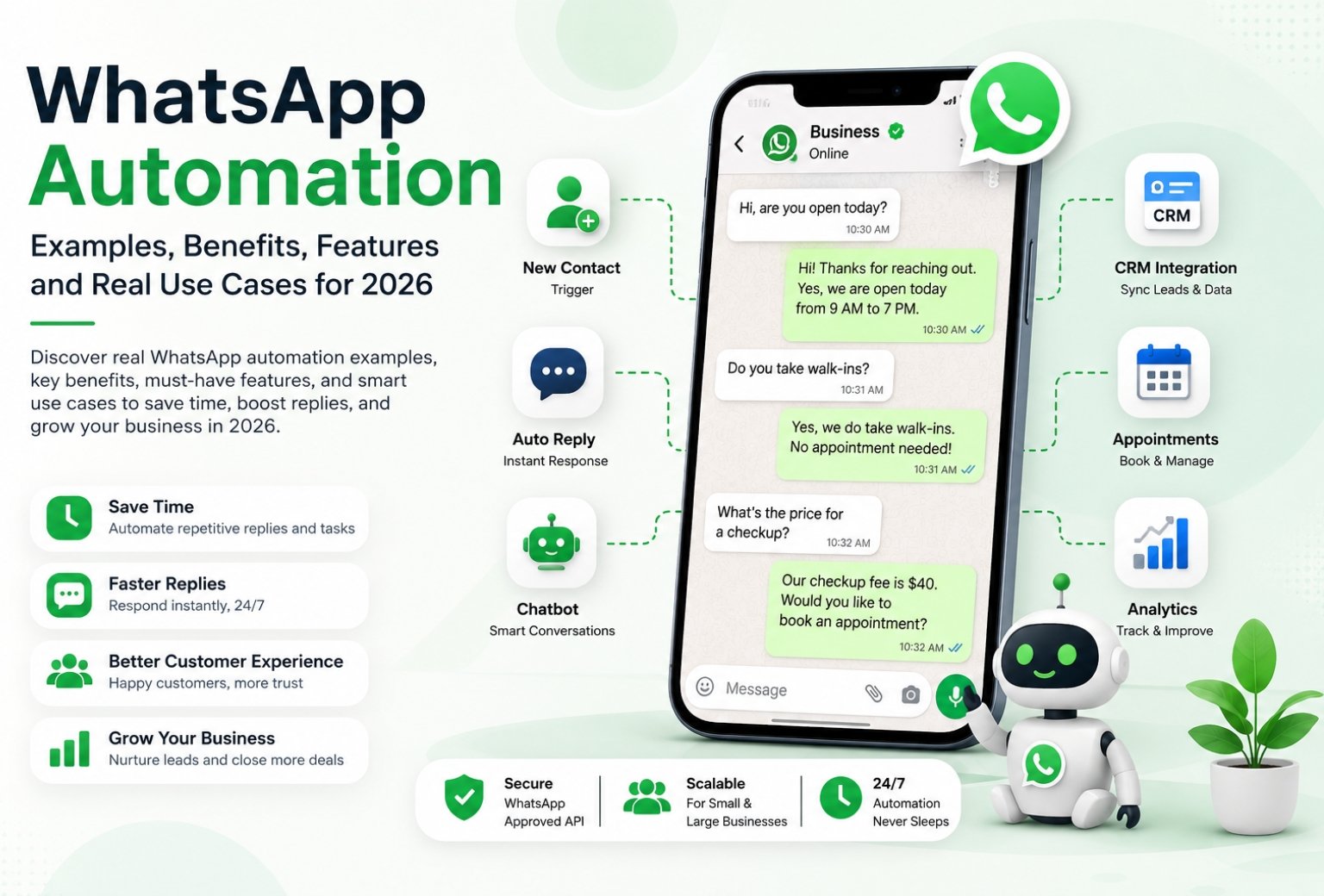
Last week a friend who runs a small clinic told me she loses about an hour every morning just replying to the same five questions on WhatsApp. Are you open today. Do you take walk ins. What’s the price for a checkup. Same questions every single day and someone on her team had to type the same answers by hand.
That’s the exact problem whatsapp automation was built to solve. This guide walks through real whatsapp automation examples you can copy today, the tools that actually work, and how to automate whatsapp messages without turning your business into a robot that annoys customers. If you run a small business and you’re tired of manual replies eating your day, you’re in the right place.
What Is WhatsApp Automation?
WhatsApp automation is the use of software to send, receive, and manage messages on WhatsApp without a human typing every single reply. It covers everything from a simple away message to a full whatsapp chatbot that qualifies leads and books appointments on its own.
In plain terms, whatsapp automation refers to any system that uses the whatsapp business platform or the whatsapp business api to trigger messages based on customer actions. Someone messages you after hours, the system sends an automatic reply. Someone abandons a cart, an automated message goes out an hour later. That’s automation lets working in the background while you sleep.
Most people confuse this with just having the whatsapp business app on their phone. The app on its own doesn’t automate much. Real automation needs a connection between whatsapp and a platform that can run rules, timers, and flows.
15 WhatsApp Automation Examples and Ideas
This is the part most people actually came here for. Real examples of whatsapp automation you can set up this week, not theory.
| Example | What Triggers It | What It Does |
|---|---|---|
| Welcome messages | New contact messages you | Sends a friendly intro and menu |
| Away messages | Message received after business hours | Sets expectations on reply time |
| Message templates | Order placed or status change | Sends approved update instantly |
| Automated messages for cart drop off | Item left in cart | Nudges customer to finish buying |
| Broadcast messages | Manual send to a list | Promo or announcement to many contacts at once |
| WhatsApp chatbot | FAQ style question | Answers instantly without a human |
| Appointment reminders | Booking made | Sends personalized messages before the visit |
| Lead qualification flow | New enquiry | Asks a few questions to sort hot from cold leads |
| Order and shipping updates | Status change in system | Keeps customer updated automatically |
| Review requests | Order marked complete | Asks for feedback a day later |
| Win back campaigns | No activity in 30 days | Sends a marketing messages nudge to return |
| Payment reminders | Invoice due date | Auto reminder before and after due date |
| Onboarding sequences | New customer signs up | Step by step welcome across a few days |
| Internal staff alerts | New high value lead comes in | Notifies the team instantly |
| Human handoff | Bot can’t answer | Routes the chat to a real person |
How Does WhatsApp Automation Work?
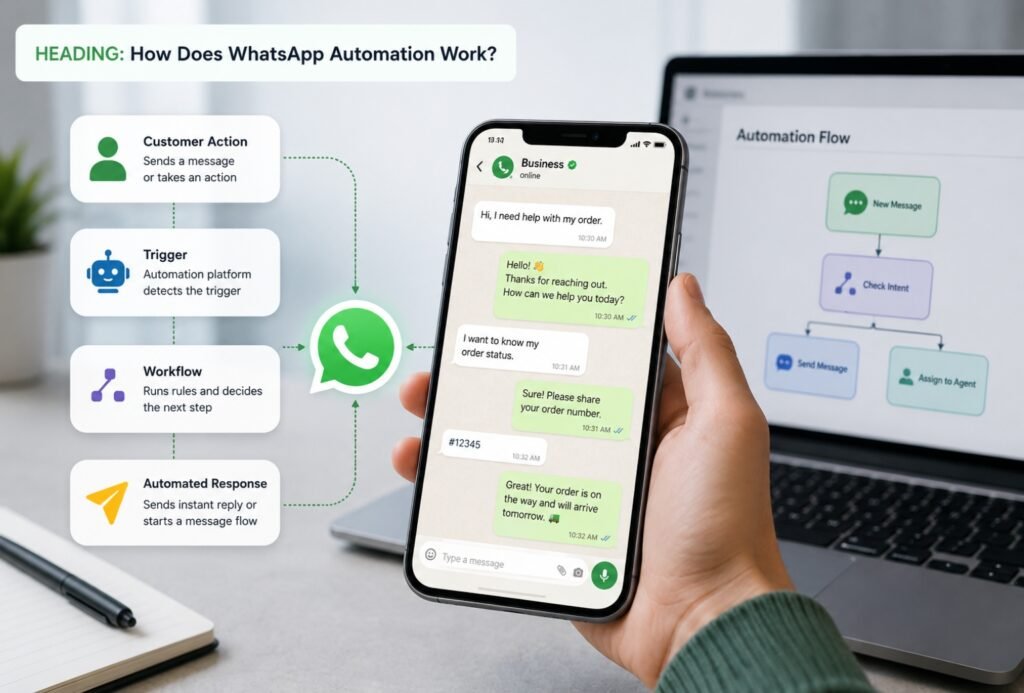
At its core, whatsapp automation work happens through triggers and responses. A customer sends a message, clicks a button, or takes an action on your site, and that triggers an automatic reply or a chain of messages based on what they did.
Basic Automation vs Advanced Automation
Basic automation is things like away messages and quick replies built right into the whatsapp business app. It’s free and it’s fine if you’re a one person shop. But it can’t hold a real conversation or update your CRM.
Advanced automation runs through the whatsapp api and connects to whatsapp flows, a CRM, and sometimes an AI chatbot layer. This is where messages based on customer behavior actually happen. Someone asks about pricing and the bot pulls the right template. Someone books a call and it lands straight in your calendar. This is the level most growing businesses end up needing, and it’s the layer our own whatsapp automation for business service is built around.
Benefits of WhatsApp Automation for Business
Here’s the thing. The benefits of whatsapp automation aren’t just about saving time, though that’s a big part of it. A few things stand out once you actually run it for a while.
- Faster replies mean better customer satisfaction. People expect an answer within minutes on WhatsApp, not hours.
- It cuts down on repetitive work so your team can focus on harder customer interactions.
- Small businesses can look and feel like a much bigger operation without hiring more staff.
- Customer experience improves because responses are consistent instead of depending on who’s on shift.
- You get data on what people are actually asking, which helps you fix gaps in your offer.
One honest downside worth mentioning. If your automation is too rigid, people notice fast and it can actually hurt customer communication instead of helping it. A bot that can’t answer a basic question and just loops back to the same menu will frustrate people more than a slow human reply would.
Key WhatsApp Automation Features
Good automation platforms share a handful of automation features that matter more than the rest. Templates, broadcast tools, CRM syncing, and smart routing to a human when needed.
WhatsApp API vs WhatsApp Business App
The whatsapp business app is built for small operations managing a handful of chats a day. It’s simple and free, but it caps out fast.
The whatsapp business api is what powers real scale. Using the whatsapp business api, you can send automated messages to thousands of contacts, connect a chatbot, and pull reports on response times. Most agencies including ours set clients up on the api because the business app or the whatsapp business app alone just can’t keep up once volumes of messages start climbing past a hundred or so a day.
CRM and Automation Platform Integration
An automation platform is only as good as what it connects to. Syncing your whatsapp crm with tools like GoHighLevel means every conversation, lead, and booking lands in one place instead of scattered across someone’s personal phone. If you’re already running pipelines elsewhere, our GoHighLevel automation work ties directly into this kind of setup.
A few of these deserve more detail because they’re the ones that move the needle most.
Sending welcome messages the moment someone messages you sets the tone. It doesn’t need to be fancy, just a quick hello and a menu of what they can ask about.
Away messages and business hours replies matter more than people think. If someone messages at 11pm and hears nothing until the next afternoon, they’ve often already messaged your competitor by then.
A whatsapp chatbot for FAQs is usually the biggest time saver. Questions like pricing, hours, and location can eat 60 percent of a small business’s inbound messages, and a bot handles those without breaking a sweat.
Lead qualification bots are where things get interesting for service businesses. Instead of a human asking budget and timeline questions over and over, the bot asks first and only forwards the serious ones. This is exactly the kind of flow we build into our AI chatbot for business setups, whether it’s for WhatsApp, a website, or Instagram.
WhatsApp Workflow Automation: Set Up Step by Step
Want to automate your own setup instead of hiring someone. Here’s roughly how it goes.
- Create a whatsapp business account and verify your business with Meta.
- Apply for official whatsapp business api access, or use a provider that already has it.
- Set up your whatsapp number so it’s connected to the api instead of just the app.
- Build your first few whatsapp templates and get them approved.
- Map out your basic flows. Welcome, FAQ, and away message at minimum.
- Connect it to your crm so leads and conversations don’t get lost.
- Test everything with a few real contacts before turning it on for everyone.
Whether whatsapp automation depends on a simple away message or a full chatbot really comes down to how many messages and tasks your team handles in a day. Under 20 a day, basic automation might be enough. Past that, you’ll want the api.
WhatsApp Business Automation Use Cases by Industry
Different industries lean on different flows. Here’s what tends to work best depending on what you run.
Ecommerce
Abandoned cart recovery and order updates are the two biggest wins here. A short reminder an hour after checkout is abandoned can recover a decent chunk of lost sales. We cover this in more depth on our ecommerce and Shopify automation page.
Real Estate
Instant enquiry response and viewing bookings make or break a deal in real estate, since leads message five agents at once and go with whoever replies first. Our real estate automation setups are built around exactly that speed.
Restaurants
Reservation bots and review requests are the go to here. A quick automated message after someone’s meal asking for a review does more for local rankings than most people expect. Full details are on our restaurant automation page.
Logistics
Dispatch updates and delivery status messages cut down on the “where’s my order” calls that flood support lines during busy seasons.
Automate WhatsApp Replies: Chatbot vs Manual
Should you automate whatsapp replies fully or keep a human in the loop. Honestly, it depends on the type of messages that prompt them.
Simple, repeatable questions like hours, location, and pricing are safe for a bot to fully own. Anything emotional, a complaint, or a complex request needs to go straight to a person. Trying to automate everything is one of the fastest ways to frustrate customers, and it’s something we walk every client through before we build anything they need to know about whatsapp bots.
Responding to messages with a mix of automation and a human safety net tends to perform better than an all or nothing setup either way.
Best Practices for WhatsApp Automation
A few things separate automation that works from automation that gets your number flagged or ignored.
- Keep templates conversational, not corporate sounding.
- Don’t send more messages than the customer actually asked for.
- Always give an easy way to reach a human.
- Test flows on a personal whatsapp number before rolling out to real customers.
- Watch your response rates, since whatsapp helps you see what’s working right inside the business manager.
Top WhatsApp Marketing Automation Tools Compared
| Tool | Key Feature | Best For |
|---|---|---|
| Meta Business Suite | Native templates and basic broadcast | Very small teams |
| GoHighLevel | Full crm plus whatsapp automation | Agencies and service businesses |
| Twilio | Developer friendly api access | Custom builds |
| Wati | Simple chatbot builder | Ecommerce and retail |
There’s no single best whatsapp tool for everyone. It really comes down to whether you need a plug and play option or something built around your exact sales process.
WhatsApp Marketing Automation Use Cases
Beyond one to one replies, whatsapp marketing automation shines for broadcast style campaigns. Send whatsapp promos to a segmented list, follow up automatically with anyone who clicked but didn’t buy, and send personalized messages based on past purchases. Messages on whatsapp for marketing convert well because open rates are far higher than email, often within minutes of sending.
How Think AI Works Solves the Lead Follow-Up Problem
Most businesses that come to us aren’t missing leads. They’re missing the system that catches them. A lead comes in through a form, an ad, or a WhatsApp message, and it sits in an inbox until someone has a free minute. By then the moment’s gone.
We build the automated lead follow-up system around wherever your leads actually come from, not just one channel. That means the trigger fires the second a lead enters your CRM, whether that lead started on a landing page, a Meta ad, or a WhatsApp conversation.
Instant Response Without Adding Headcount
You don’t need a bigger sales team to follow up faster. You need the first message to go out automatically, then a person to step in once someone actually replies. That’s the balance we build every workflow around.
One Pipeline, Every Lead Source Connected
If leads come in through five different channels and land in five different places, half of them get missed by default. We pull every source into one pipeline through our GoHighLevel automation setup, so nothing depends on someone remembering to check a second inbox.
Follow-Up That Adapts to Each Lead
Not every lead should get the same sequence. A warm lead ready to book and a cold one that just downloaded a guide need different messages at different speeds. We build the logic so the system tells the difference, using lead scoring to decide who gets a fast direct offer and who goes into a longer nurture track.
Why Choose Think AI Works for Lead Follow-Up Automation
Plenty of agencies will set up a follow-up email and call it automation. We build the full loop, capture, trigger, sequence, and handoff, so nothing depends on a person remembering a step.
What we bring that’s harder to copy is the combination. We’re not just a CRM reseller and we’re not just a chatbot shop. We connect lead capture, WhatsApp and email follow-up, AI-assisted scoring, and CRM workflows into one system, which means fewer handoffs between tools and fewer places for a lead to get lost.
We also don’t hand you a finished automation and disappear. Sequences get reviewed and adjusted based on what’s actually converting, not left running on autopilot from day one. That ongoing part is where most DIY setups fall behind, since a sequence built once in January rarely still fits how leads behave by summer.
Benefits of Working With Think AI Works
The real value isn’t the automation itself, it’s what stops happening once it’s running.
- Leads stop sitting unanswered overnight or over a weekend, since the first message goes out the moment they come in.
- Your sales team spends time on leads that are actually engaged instead of working through a list in order.
- Follow-up stays consistent even during busy weeks, so nothing slips just because someone was slammed with other work.
- Reporting shows which messages in the sequence are actually landing, so the follow-up system gets better over time instead of staying static.
- You get one pipeline instead of leads scattered across email, WhatsApp, and ad platform inboxes.
Each of these ties back to the same problem this article opened with. A lead that goes cold overnight isn’t a sales problem, it’s a system problem, and that’s the part we’re built to fix.
Case Study: Fixing a Broken Follow-Up Process
The problem. A client running lead generation through Meta ads and a website form was losing a noticeable share of leads simply because responses depended on whoever was free that day. Leads that came in after hours or over the weekend often didn’t get a reply until the following business day, by which point several had already gone with a competitor.
The approach. We mapped every point a lead could enter the business, the ad form, the website, and WhatsApp enquiries, into a single CRM pipeline. From there we built an automated follow-up sequence that fired an instant confirmation message, followed by a short value message within a day, and a direct offer if there was still no reply after that.
The solution. Lead scoring was added so replies showing real intent got routed straight to the sales team, while lower intent leads moved into a longer nurture sequence instead of getting dropped entirely. Nothing sat waiting on a person to notice it.
Let’s take the busywork off your plate.
Book a free 30-minute call and we’ll map out exactly where automation can save you hours every week — no pressure, no jargon.
Let’s take the busywork off your plate.
Book a free 30-minute call and we’ll map out exactly where automation can save you hours every week — no pressure, no jargon.
How to Automate Your WhatsApp with ThinkAIWorks
If you’ve read this far and you’re thinking about doing this yourself, that’s fair, plenty of small businesses start there. But if you want it done right the first time without weeks of trial and error, that’s what we do every day.
We help you automate everything from a basic away message setup to a full lead qualification bot connected to your crm. Our AI lead generation clients often run whatsapp qualification as the final step after ads bring the lead in, so the whole funnel closes the loop automatically.
Frequently Asked Questions
u003cstrongu003eWhat is WhatsApp automation?u003c/strongu003e
It’s the use of software to send and manage WhatsApp messages without a person typing each reply by hand. It ranges from a basic away message to a full chatbot.
u003cstrongu003eHow does WhatsApp automation work?u003c/strongu003e
A trigger, like a new message or an order status change, sets off an automatic reply or a sequence of messages built ahead of time.
u003cstrongu003eCan I automate WhatsApp messages for free?u003c/strongu003e
Yes, to a point. The free whatsapp business app has basic away messages and quick replies, but real automation at scale needs the paid api.
u003cstrongu003eWhat is the WhatsApp Business API used for?u003c/strongu003e
It’s used to send automated messages, templates, and chatbot replies at a scale the regular app can’t handle, often thousands of conversations a day.
u003cstrongu003eHow do I automate WhatsApp replies?u003c/strongu003e
You connect your number to the whatsapp business api through a platform, then build reply flows based on common questions and actions.
u003cstrongu003eWhat’s the difference between the WhatsApp Business App and the API?u003c/strongu003e
The app is free and manual friendly for small volume. The api is built for automation, integrations, and higher message volume.
u003cstrongu003eIs WhatsApp automation allowed under WhatsApp’s policy?u003c/strongu003e
Yes, as long as you follow Meta’s messaging rules, use approved templates for outbound messages, and don’t spam people who haven’t opted in.
u003cstrongu003eWhat are the best WhatsApp automation tools?u003c/strongu003e
It depends on your setup. GoHighLevel works well for agencies and service businesses, Wati suits ecommerce, and Twilio is solid for custom developer builds.
u003cstrongu003eHow much does WhatsApp automation cost?u003c/strongu003e
Costs vary by message volume and provider, usually a small per conversation fee from Meta plus a monthly platform fee. Most small businesses spend well under 200 dollars a month to start.
u003cstrongu003eCan I send broadcast messages on WhatsApp automatically?u003c/strongu003e
Yes, through the api using approved templates, though you can only message people who’ve opted in first.
u003cstrongu003eWhat is a WhatsApp chatbot?u003c/strongu003e
It’s an automated flow that answers common questions or guides a customer through a process like booking, without a human replying live.
u003cstrongu003eHow do I set up away messages on WhatsApp Business?u003c/strongu003e
In the free app it’s under Business Tools and Away Message. On the api side it’s usually built as the first step in your automation flow.
u003cstrongu003eCan WhatsApp automation integrate with my CRM?u003c/strongu003e
Yes, most api based platforms sync directly with CRMs so every chat and lead lands in one place instead of staying stuck on a phone.
u003cstrongu003eWhat industries benefit most from WhatsApp automation?u003c/strongu003e
Ecommerce, real estate, restaurants, and any service business with a high volume of repeat questions all see fast results.
u003cstrongu003eHow many WhatsApp messages can I automate per day?u003c/strongu003e
There’s no fixed cap on automation itself, but Meta sets messaging tiers based on your account quality, starting around 1000 conversations a day and scaling up as your number earns trust.
Wrapping Up
Whatsapp automation isn’t about replacing your team, it’s about giving them room to handle the messages that actually need a human touch. Start small with an away message and a welcome flow, then build up to a full chatbot once you know what your customers actually ask for.
If you’d rather skip the trial and error and get it built properly the first time, reach out to our team and we’ll walk you through what a setup would look like for your business.