Table of Contents
If you want to train chatbot on your own data you first need to understand why most chatbots fail before they even get started. They give generic answers because nobody bothered to feed them the one thing that actually matters: your business data. If you have ever asked a bot about your return policy and got a canned reply that sounded like it came straight from ChatGPT’s default brain, you already know what I mean.
The Realistic Way to Train Your Chatbot
Learning how to train a chatbot on your own data is no longer a technical mountain. You do not need a data science degree or a six-figure budget to get started. What you actually need is a structured training process. Whether you want to configure one of our existing custom chatbots or build from scratch, feeding relevant data ensures your bot sounds like your brand instead of a generic system.
What You Will Achieve With Your Own Dataset
By following this guide, you will turn a folder of PDFs, FAQs, and support tickets into an assistant that truly understands your business. Instead of hallucinating answers, your bot will reference your actual files to solve real customer queries on the first try.
What Does It Mean to Train a Chatbot on Your Own Data
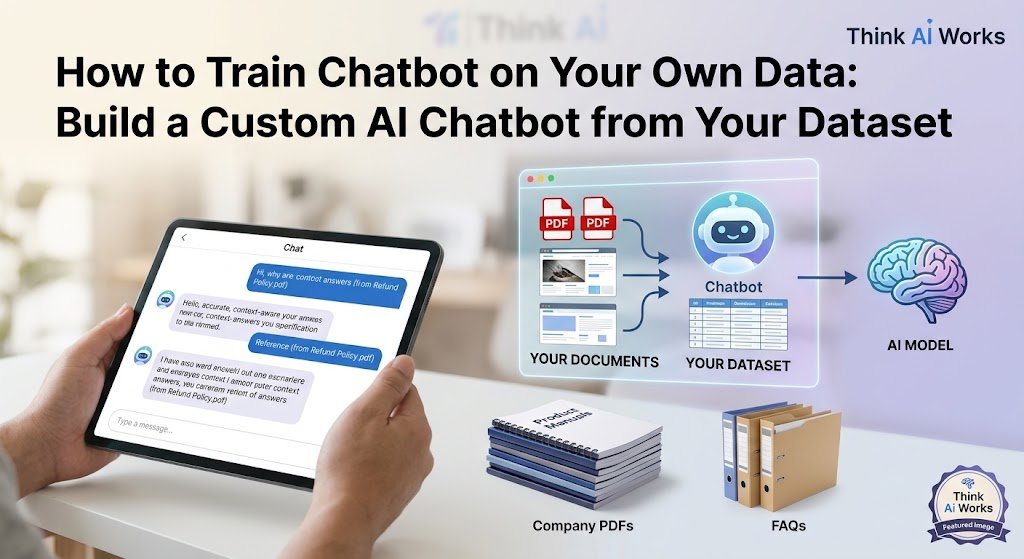
Training a chatbot on your own data means giving an AI model access to your documents, your FAQs, your product pages and your past conversations so it answers using that information instead of whatever it already knows from the internet. In most cases this happens through a method called retrieval instead of true model retraining. The bot searches your dataset for the most relevant chunk of text and uses that to build its answer.
That distinction matters more than people think. A chatbot trained on a massive general dataset like the ones behind ChatGPT or GPT-4 already knows a lot about the world. What it does not know is your refund window, your pricing tiers or the exact wording your support team uses. Feeding it your own training data closes that gap, and most modern ai models are built to accept exactly this kind of custom context without needing a full retrain.
Why Train an AI Chatbot Instead of Using ChatGPT Out of the Box
Because a stock AI chatbot has no idea who you are. Ask it about your shipping policy and it will either make something up or tell you it does not have that information. Neither is great for a customer standing at checkout with a question.
A custom data chatbot fixes that. Once you train the model on your own material it starts answering specific questions the way a trained employee would, using your language and your actual policies. A chatbot using this kind of setup handles far more chatbot interactions correctly on the first try. We have watched this play out with restaurant clients using WhatsApp bots and with ecommerce clients running Shopify stores, and it is one of the reasons more businesses are moving toward ai chatbots for support instead of static contact forms. The difference between a generic bot and one that understands your business is night and day in how customers respond to it.
Generic AI vs Domain Specific Chatbot
A generic model answers from broad internet knowledge. A domain-specific chatbot answers from your documents first and falls back to general knowledge only when nothing relevant exists in your dataset. That fallback behavior alone is worth building correctly, because a bot that guesses confidently on things it does not know is worse than one that simply says it needs to check.
Data Collection: What Data Sources Actually Work
Good data collection is where most projects either succeed or quietly fall apart. You are not looking for the biggest pile of files. You are looking for the right ones.
PDFs Docs and Manuals
PDF files are usually the backbone of a first training round. Product manuals, policy documents, pricing sheets, onboarding handbooks. Most training tools can pull text straight out of a PDF and chunk it automatically.
FAQs and Support Tickets
Old support tickets are a goldmine nobody uses enough. Real questions and answers your team has already handled show the bot exactly how customers phrase things, which is different from how a manual phrases things.
Website URLs and Knowledge Base Pages
You can point a crawler at a URL and pull content directly off your site or your knowledge base. This works well for keeping a chatbot updated automatically when your knowledgebase changes, since some tools recheck the page on a schedule.
CSV and Structured Data
CSV files work for things like product catalogs, price lists or order status codes. Structured data types like this often need a bit more preprocessing before they read naturally in a chatbot response, but they are worth including for anything ecommerce related.
RAG vs Fine-Tuning: Which Method Should You Use
Retrieval augmented generation, usually shortened to RAG, is the method most businesses should start with. Fine-tuning is a different and heavier approach where you actually retrain the model’s internal weights on your dataset. For a lot of business chatbot use cases RAG gets you 90 percent of the value with a fraction of the cost and effort.
How Retrieval Works
Your documents get broken into chunks and converted into embed vectors, which are just numeric representations of meaning. When a customer sends a query the system finds the chunks whose vectors are closest in meaning and hands those to the language model as context. The model then writes an answer based on that context instead of pure memory.
When Fine-Tuning a Model Makes Sense
Fine-tuning makes sense when you need the bot to consistently write in a very specific tone, follow a rigid format, or handle a narrow task thousands of times a day. OpenAI’s fine tuning tools let you train a model on your own examples so it internalizes a style rather than just retrieving facts. An ai chatbot trained this way tends to stay more contextual within a narrow domain because the style is baked in rather than pulled from a document each time. It is more expensive to set up and it needs retraining every time your underlying information changes, which is a real tradeoff worth knowing upfront. Either path counts as real ai training, just at a different depth.
| Factor | RAG | Fine-Tuning |
|---|---|---|
| Setup cost | Lower | Higher |
| Update speed | Add a file and it updates | Needs a new training run |
| Best for | FAQs support product info | Tone, format, narrow repeated tasks |
| Data privacy | Data can stay in your own vector store | Data gets baked into model weights |
| Typical business fit | Most small and mid size businesses | Larger teams with dedicated ML resources |
Step by Step: How to Train Your Chatbot on Your Own Data
This is the actual training process broken into steps, the same order we follow internally whenever a client asks us to train chatbot systems for their own support team.
Step 1: Data Collection and Cleanup. Pull together your PDFs, FAQs, CSV files and any URL sources you plan to use. Strip out anything outdated or contradictory before it goes anywhere near the model.
Step 2: Data Preprocessing. This is where files get split into smaller chunks, cleaned of formatting junk, and tagged with basic metadata like source and date. Skipping this step is the single biggest reason chatbot answers come back messy.
Step 3: Generate Embeddings and Build a Vector Store. Each chunk gets converted into a vector and stored in a vector database. This is what lets the bot search by meaning instead of exact keyword matching.
Step 4: Connect to a Language Model. You link your vector store to a language model, commonly GPT-4 through the OpenAI API, though open-source models work too if you want more control. This is the layer that reads retrieved chunks and writes the actual reply.
Step 5: Test Queries and Refine Intent Matching. Run real customer questions through it. Watch where it misreads intent or misses a relevant chunk. Adjust chunk size or add missing documents based on what breaks.
Step 6: Deploy the Chatbot. Push it live on your website, an app, or a channel like WhatsApp. A lot of our clients deploy their trained chatbot straight into WhatsApp Automation for Business since that is where their customers already are.
Step 7: Retrain as New Data Comes In. A chatbot is never really finished. New products, new policies, new FAQs. You retrain by adding new data to the vector store, which is far faster than a full fine-tuning run.
Building a Custom AI Chatbot: No-Code vs API and Python
You have two real paths here and neither is wrong, they just fit different situations.
No-Code Platforms
No-code tools are the fastest way to create a chatbot without writing anything. Upload files, connect a URL, and you have a working bot in an afternoon. Good for testing an idea fast or for teams without a developer on hand. The tradeoff is less control over how chunking, retrieval and prompt behavior actually work under the hood.
Custom Build With OpenAI API and Python
If you want a scalable setup that can grow into something more than a simple FAQ bot, building with Python and the OpenAI API gives you full control. This is really where developing a chatbot turns into building ai infrastructure rather than just filling out a form. You decide how documents get chunked, how the ai agent handles multi-step questions, and how it connects to your CRM or booking system.
Teams that want to develop a chatbot with real logic behind it, not just canned answers, usually end up here. It takes longer to set up but it scales with the business instead of hitting a ceiling, and building a chatbot this way makes it much easier to create custom flows for different types of customers later on.
Real Use Cases for a Chatbot Trained on Your Own Data
Customer Support Bots
The most common use case by far. An effective chatbot trained on your policies, product specs and past tickets can resolve a large share of routine customer support interactions without a human touching them.
Internal Knowledge Base Bots
Employees ask a bot instead of digging through a shared drive. This alone saves hours a week once the internal knowledge base is properly indexed.
Sales and Lead Qualification Bots
A chatbot can ask qualifying questions, capture contact details, and hand off a hot lead to a human at the right moment. Pair that with something like AI Lead Generation Agency services and you get a full pipeline from first message to booked call.
Ecommerce Product Bots
Trained on your catalog, an ecommerce bot answers specific questions about sizing, stock and order status instead of sending every shopper to a search bar. We build this exact setup as part of our Ecommerce and Shopify Automation work for online stores.
Data Privacy and Security When Training on Business Data
Data privacy is not optional once real customer information touches your training pipeline. Keep an eye on where the vector store lives, who has access, and whether the platform you pick has a privacy policy that actually says what happens to your files after upload. If you are handling sensitive business data, ask any vendor directly whether your content is used to train their public models, because some platforms do this by default unless you opt out.
Common Mistakes When Training a Custom Chatbot
A few things trip people up over and over. Skipping data preprocessing and dumping raw files straight in. Assuming natural language processing means the bot understands everything perfectly on day one, it does not, it needs testing. Forgetting to retrain once new data shows up, so the bot slowly goes stale. And treating intent detection as a solved problem when it usually needs a few rounds of real user testing to get right.
Let’s take the busywork off your plate.
Book a free 30-minute call and we’ll map out exactly where automation can save you hours every week — no pressure, no jargon.
FAQs About train chatbot on your own data
u003cstrongu003eWhat does it mean to train a chatbot on your own data?u003c/strongu003e
It means giving the AI access to your documents, FAQs and past conversations so it answers using your actual business information rather than generic internet knowledge.
u003cstrongu003eCan I train ChatGPT on my own documents?u003c/strongu003e
Yes, through OpenAI’s tools you can either use retrieval methods to feed it documents or use their fine-tuning process to adjust the model itself, depending on how deep you want to go.
u003cstrongu003eWhat is the difference between RAG and fine-tuning?u003c/strongu003e
RAG retrieves relevant chunks from your documents at query time and hands them to the model as context. Fine-tuning actually retrains the model’s internal weights on your examples, which costs more and updates slower.
u003cstrongu003eWhat file types can I upload to train a chatbot?u003c/strongu003e
PDF, CSV, DOCX and plain URL sources are the most common. Most platforms support uploading files directly along with pointing a crawler at a website.
u003cstrongu003eDo I need to code to train a custom chatbot?u003c/strongu003e
No. No-code platforms exist for exactly this. If you want deeper customization or plan to build a more capable ai agent, learning basic Python opens up a lot more flexibility.
u003cstrongu003eHow much data do I need to train an effective chatbot?u003c/strongu003e
There is no fixed amount of data required. A focused FAQ set of even fifty questions and answers can outperform a messy pile of a thousand documents if the smaller set is clean and specific.
u003cstrongu003eHow long does it take to train a chatbot on business data?u003c/strongu003e
A basic RAG setup can be running within a day or two once your documents are collected. A custom build with API integrations usually takes one to three weeks depending on complexity.
u003cstrongu003eIs my business data safe when training a chatbot?u003c/strongu003e
It depends entirely on the platform and setup you choose. Look for a stated privacy policy, ask where the vector store is hosted, and confirm your data is not used to train anyone else’s public model.
u003cstrongu003eCan I retrain the chatbot as my data changes?u003c/strongu003e
Yes, and you should plan for it. Retraining with RAG usually just means updating the vector store with new files. Fine-tuned models need a fresh training run instead.
u003cstrongu003eWhat is the cost difference between a no-code tool and a custom API build?u003c/strongu003e
No-code tools typically run a monthly subscription fee with limits on documents or queries. A custom build with the OpenAI API costs based on actual usage, which can be cheaper at scale but needs development time upfront.
u003cstrongu003eCan a trained chatbot answer questions outside its dataset?u003c/strongu003e
A well built one should say it does not know rather than guess. That behavior needs to be configured deliberately, since left alone a language model will often answer confidently even when it is wrong.
u003cstrongu003eWhich AI model is best for training on custom data, GPT-4 or an open-source model?u003c/strongu003e
GPT-4 through the OpenAI API is the easiest starting point for most businesses because it needs less setup. Open-source models give more control over data privacy and cost at scale but need more technical work to run well.