
Table of Contents
Most people trying how to set up whatsapp business api for the first time expect the hard part to be technical. It’s not. The hard part is almost always business verification. I’ve watched teams get the api connected in an afternoon and then sit stuck for two weeks waiting on Meta to approve their business manager account.
This guide walks through the whole thing in order. What the whatsapp business api actually is how it’s different from the regular app what you need before you even start and every setup step from creating your meta business manager account to sending your first test message. There’s also a real answer on whether a free whatsapp api option exists because that question comes up constantly. If you’d rather skip the manual work entirely ThinkAIWorks handles whatsapp automation setup for businesses that want it running without touching a single settings page themselves.
What Is the WhatsApp Business API (and How It’s Different From the App)
The whatsapp business api is a message sending system built for companies that need more volume and more control than a single phone can handle. Unlike the whatsapp business app which lives on one device the api connects directly into your own systems or a chatbot platform.
Here’s the part that trips people up. The free app is fine for a small shop answering a dozen chats a day by hand. But the second you want automated replies bulk sending or a proper whatsapp business platform tied into a crm the app just can’t do it. That’s when businesses move to the api and usually go through a whatsapp business solution provider or connect straight into Meta’s whatsapp cloud api themselves.
WhatsApp API Requirements Before You Start
You need a few things lined up before Meta will even let you begin. A business website is required and it has to look like a real operating business not a placeholder page. Some regions also ask for a business license depending on your industry and country.
You’ll also need your business assets organized inside a meta business manager account which includes your ad accounts pages and eventually your whatsapp business account. If you already run an existing whatsapp business account or have an existing whatsapp business number you can migrate that instead of starting from zero which honestly saves a lot of the setup process. One thing people forget is that using the whatsapp business app and the api at the same time on the same number isn’t allowed so decide early which path you’re on.
WhatsApp Business Account Verification and Meta Business Verification
Business verification is the single biggest bottleneck in this whole process and it’s worth understanding before you hit submit.
Setting Up Your Meta Business Manager Account
Start by creating your meta business manager account if you don’t already have one. This is where your business portfolio your business profile and every asset tied to your company gets stored under one login.
Facebook Business Manager Verification Steps
From inside facebook business manager you’ll go through facebook business manager account verification which asks for documents proving the business is legit. That usually means a registration certificate a utility bill or a tax document matching your business name exactly.
How Long Business Verification Takes
Meta business verification for whatsapp typically takes anywhere from a day to about two weeks. In my experience the delays almost always come down to a mismatched name between the document and what’s listed on facebook business itself so double check that before submitting anything.
How to Set Up WhatsApp Business API: Step-by-Step Setup Steps
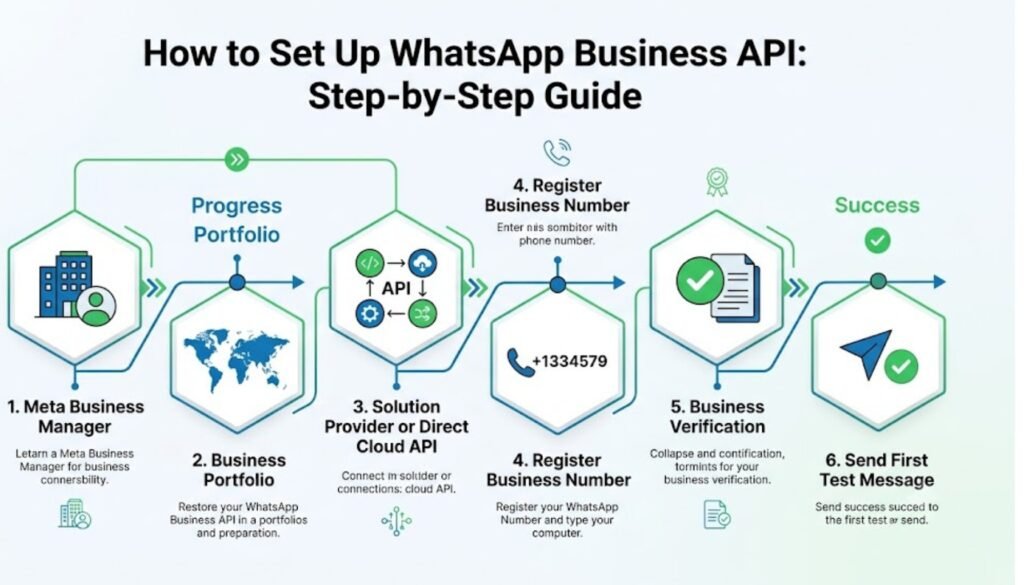
Here are the actual setup steps in the order Meta expects them. Skipping ahead usually just means backtracking later.
Step 1: Create or Log Into Your Meta Business Manager Account
Log into business manager and confirm your account is set up correctly before adding anything else.
Step 2: Add Your Business Portfolio and Business Profile
Fill in your meta business portfolio details and complete your business profile including address and business communication contact info.
Step 3: Choose a WhatsApp Business Solution Provider or Use the Cloud API Directly
Decide whether you want a whatsapp business solution provider handling the technical side or whether you’re comfortable connecting to the whatsapp cloud api yourself. Most non technical teams go with a provider. Developers usually go direct.
Step 4: Register Your WhatsApp Business Number
Add your whatsapp business number during whatsapp onboarding. This can be a brand new number or you can integrate whatsapp using a number you already use for business calling as long as it’s not still active on a personal whatsapp app.
Step 5: Complete Business Verification
Submit your documents for verification as covered above. This step is what set up the api actually waits on more than anything technical.
Step 6: Connect the API and Send a Test Message
Once approved connect the api and send a test message to confirm everything’s working. If you’d rather have someone handle this whole setup process ThinkAIWorks’ whatsapp automation team sets it up and tests it before handing it back to you.
WhatsApp Business API Pricing: Is There a Free WhatsApp API Option
There’s a genuine free whatsapp api layer built into how Meta charges. Service conversations replies within a 24 hour window generally don’t cost anything.
| Message Type | Typical Cost |
|---|---|
| Service replies (within 24hr window) | Free |
| Marketing or campaign messages | Per conversation fee |
| Cloud API hosting | Free through Meta directly |
| Business solution provider fee | Varies by provider |
So yes there’s a free whatsapp business layer for regular whatsapp support conversations but whatsapp business api pricing kicks in once you’re sending marketing template messages or running a whatsapp campaign outside that window. Most business solution provider platforms also charge their own monthly fee on top of Meta’s rates so it’s worth comparing whatsapp api providers before committing to one.
WhatsApp API Integration: Connecting a Chatbot or CRM
A whatsapp api integration on its own just sends and receives messages. The real value shows up once you connect it to something smarter.
That’s usually a chatbot handling replies automatically or a crm logging every whatsapp chat against the right customer. ThinkAIWorks’ AI chatbot for business setup plugs directly into this layer so a whatsapp chatbot can qualify leads book appointments and automate whatsapp messages without a person watching the inbox all day. Businesses running whatsapp chatbots this way usually cut response time from hours down to seconds.
Business Messaging Features: WhatsApp Marketing, Broadcasts, and Flows
Once the api is live you get access to features the basic app never offers. Whatsapp marketing campaigns let you send approved template messages to opted in whatsapp users. Whatsapp broadcasts push updates to a list at once instead of one chat at a time. And whatsapp flows let you build structured screens like forms or booking steps right inside the chat window.
These whatsapp api features are honestly where the api starts paying for itself. A restaurant running review requests through broadcasts or a real estate team using flows to collect buyer details both save hours a week compared to manually messaging one person at a time.
Choosing a WhatsApp Business Solution Provider
Not every business wants to touch raw api documentation and that’s completely fair. A whatsapp business solution provider handles the technical connection for you and usually bundles in a chatbot builder or crm on top.
The tradeoff is cost since most providers charge a monthly fee layered on top of Meta’s own rates. If you’re planning to scale your business and send high volume the official whatsapp route through a solid provider tends to work out cheaper long term than sticking with manual replies. Teams already using GoHighLevel automation for their pipelines often connect their whatsapp business api account directly into that same system instead of adding a separate tool.
Common Setup Mistakes and Troubleshooting
The most common mistake is submitting business verification with a name that doesn’t exactly match across documents. Even a missing “LLC” or a different address format can get it rejected.
The second is trying to run the whatsapp business app and the api on the same number at once which Meta simply won’t allow. And the third is skipping the test message step before going live which is how businesses end up finding out their integration is broken only after a real customer messages in.
How Think AI Works Solves the Lead Follow-Up Problem
Most businesses that come to us aren’t missing leads. They’re missing the system that catches them. A lead comes in through a form, an ad, or a WhatsApp message, and it sits in an inbox until someone has a free minute. By then the moment’s gone.
We build the automated lead follow-up system around wherever your leads actually come from, not just one channel. That means the trigger fires the second a lead enters your CRM, whether that lead started on a landing page, a Meta ad, or a WhatsApp conversation.
Instant Response Without Adding Headcount
You don’t need a bigger sales team to follow up faster. You need the first message to go out automatically, then a person to step in once someone actually replies. That’s the balance we build every workflow around.
One Pipeline, Every Lead Source Connected
If leads come in through five different channels and land in five different places, half of them get missed by default. We pull every source into one pipeline through our GoHighLevel automation setup, so nothing depends on someone remembering to check a second inbox.
Follow-Up That Adapts to Each Lead
Not every lead should get the same sequence. A warm lead ready to book and a cold one that just downloaded a guide need different messages at different speeds. We build the logic so the system tells the difference, using lead scoring to decide who gets a fast direct offer and who goes into a longer nurture track.
Why Choose Think AI Works for Lead Follow-Up Automation
Plenty of agencies will set up a follow-up email and call it automation. We build the full loop, capture, trigger, sequence, and handoff, so nothing depends on a person remembering a step.
What we bring that’s harder to copy is the combination. We’re not just a CRM reseller and we’re not just a chatbot shop. We connect lead capture, WhatsApp and email follow-up, AI-assisted scoring, and CRM workflows into one system, which means fewer handoffs between tools and fewer places for a lead to get lost.
We also don’t hand you a finished automation and disappear. Sequences get reviewed and adjusted based on what’s actually converting, not left running on autopilot from day one. That ongoing part is where most DIY setups fall behind, since a sequence built once in January rarely still fits how leads behave by summer.
Benefits of Working With Think AI Works
The real value isn’t the automation itself, it’s what stops happening once it’s running.
- Leads stop sitting unanswered overnight or over a weekend, since the first message goes out the moment they come in.
- Your sales team spends time on leads that are actually engaged instead of working through a list in order.
- Follow-up stays consistent even during busy weeks, so nothing slips just because someone was slammed with other work.
- Reporting shows which messages in the sequence are actually landing, so the follow-up system gets better over time instead of staying static.
- You get one pipeline instead of leads scattered across email, WhatsApp, and ad platform inboxes.
Each of these ties back to the same problem this article opened with. A lead that goes cold overnight isn’t a sales problem, it’s a system problem, and that’s the part we’re built to fix.
Case Study: Fixing a Broken Follow-Up Process
The problem. A client running lead generation through Meta ads and a website form was losing a noticeable share of leads simply because responses depended on whoever was free that day. Leads that came in after hours or over the weekend often didn’t get a reply until the following business day, by which point several had already gone with a competitor.
The approach. We mapped every point a lead could enter the business, the ad form, the website, and WhatsApp enquiries, into a single CRM pipeline. From there we built an automated follow-up sequence that fired an instant confirmation message, followed by a short value message within a day, and a direct offer if there was still no reply after that.
The solution. Lead scoring was added so replies showing real intent got routed straight to the sales team, while lower intent leads moved into a longer nurture sequence instead of getting dropped entirely. Nothing sat waiting on a person to notice it.
Let’s take the busywork off your plate.
Book a free 30-minute call and we’ll map out exactly where automation can save you hours every week — no pressure, no jargon.
Frequently Asked Questions
u003cstrongu003eHow do I set up WhatsApp Business API for free?u003c/strongu003e
The api connection itself through Meta’s cloud api is free and service replies within the 24 hour window don’t cost anything either. You’ll only pay once you send marketing messages outside that window or if you choose a paid business solution provider for extra features.
u003cstrongu003eWhat documents do I need for WhatsApp business account verification?u003c/strongu003e
You typically need a business registration document and something matching your business name and address like a utility bill or tax filing. The name on every document needs to match exactly what’s listed in your meta business manager account.
u003cstrongu003eHow long does Meta business verification take for WhatsApp?u003c/strongu003e
It usually falls somewhere between one day and two weeks. Mismatched business names between documents are the most common reason it takes longer.
u003cstrongu003eWhat’s the difference between WhatsApp Business App and WhatsApp Business API?u003c/strongu003e
The app is a free single device tool for small volume manual replies. The whatsapp business api connects into your own systems or a provider and supports automation bulk messaging and integrations the app can’t handle.
u003cstrongu003eDo I need a business website to get WhatsApp API access?u003c/strongu003e
Yes generally. Meta expects a real functioning business website as part of the verification process to confirm you’re an actual operating business.
u003cstrongu003eCan I use my existing WhatsApp business number with the API?u003c/strongu003e
In most cases yes as long as that number isn’t still active inside the regular whatsapp business app. You’ll migrate the existing whatsapp business account over during setup instead of starting with a new number.
u003cstrongu003eWhat is the WhatsApp Cloud API and is it free?u003c/strongu003e
It’s Meta’s own hosted version of the api that you can connect to directly without a third party provider. Hosting through Meta is free though you’ll still pay for messages sent outside the free service window.
u003cstrongu003eHow much does WhatsApp Business API pricing cost per message?u003c/strongu003e
Service replies within 24 hours are free. Marketing and template messages outside that window carry a per conversation fee that varies by country and message category.
u003cstrongu003eDo I need a WhatsApp business solution provider or can I connect directly?u003c/strongu003e
You can connect directly to the whatsapp cloud api if you have development resources. Most businesses without an in house developer use a provider since it bundles the technical setup with a chatbot or crm.
u003cstrongu003eWhat is a Meta Business Manager account and do I need one?u003c/strongu003e
It’s the central hub where Meta stores your business portfolio ad accounts and whatsapp business account. Yes you need one before you can begin any part of the api setup.
u003cstrongu003eCan I integrate WhatsApp API with a chatbot or CRM?u003c/strongu003e
Yes and it’s one of the main reasons businesses upgrade from the app to the api in the first place. A proper whatsapp api integration lets a chatbot handle replies automatically while logging every conversation into your crm.
u003cstrongu003eWhat is WhatsApp Business API used for besides support?u003c/strongu003e
Beyond customer support businesses use it for whatsapp marketing campaigns broadcasts appointment reminders and lead qualification through automated flows.
u003cstrongu003eWhy did my WhatsApp business verification get rejected?u003c/strongu003e
The most common reason is a business name or address that doesn’t match exactly across your submitted documents and your facebook business manager account. Double checking that before resubmitting usually resolves it.
Final Thoughts
Setting up the whatsapp business api isn’t really the hard part people assume it is. The connection itself takes an afternoon. It’s the verification paperwork and getting your meta business manager account structured correctly that eats the time. Once it’s live though you get access to broadcasts flows chatbot integration and messaging volume the regular app was never built to handle.
If you’d rather have this whole setup process handled properly the first time instead of troubleshooting a rejected verification twice ThinkAIWorks’ whatsapp automation team builds and tests the entire connection for you.