
Table of Contents
A lead fills out a form on your site at 9pm. Nobody sees it until the next afternoon. By then they’ve already messaged two competitors and booked a call with whoever answered first.
That’s the whole problem in one sentence, and it’s why so many businesses are trying to automate lead follow up instead of leaving it to whoever’s free. This guide walks through how to build an automated lead follow-up system that actually works, not just a checklist of software names. You’ll get a real workflow, template structure you can copy, and an honest look at where AI helps and where it doesn’t. If you’ve been meaning to fix this for your own AI lead generation funnel, this is the place to start.
What Does It Mean to Automate Lead Follow-Up?
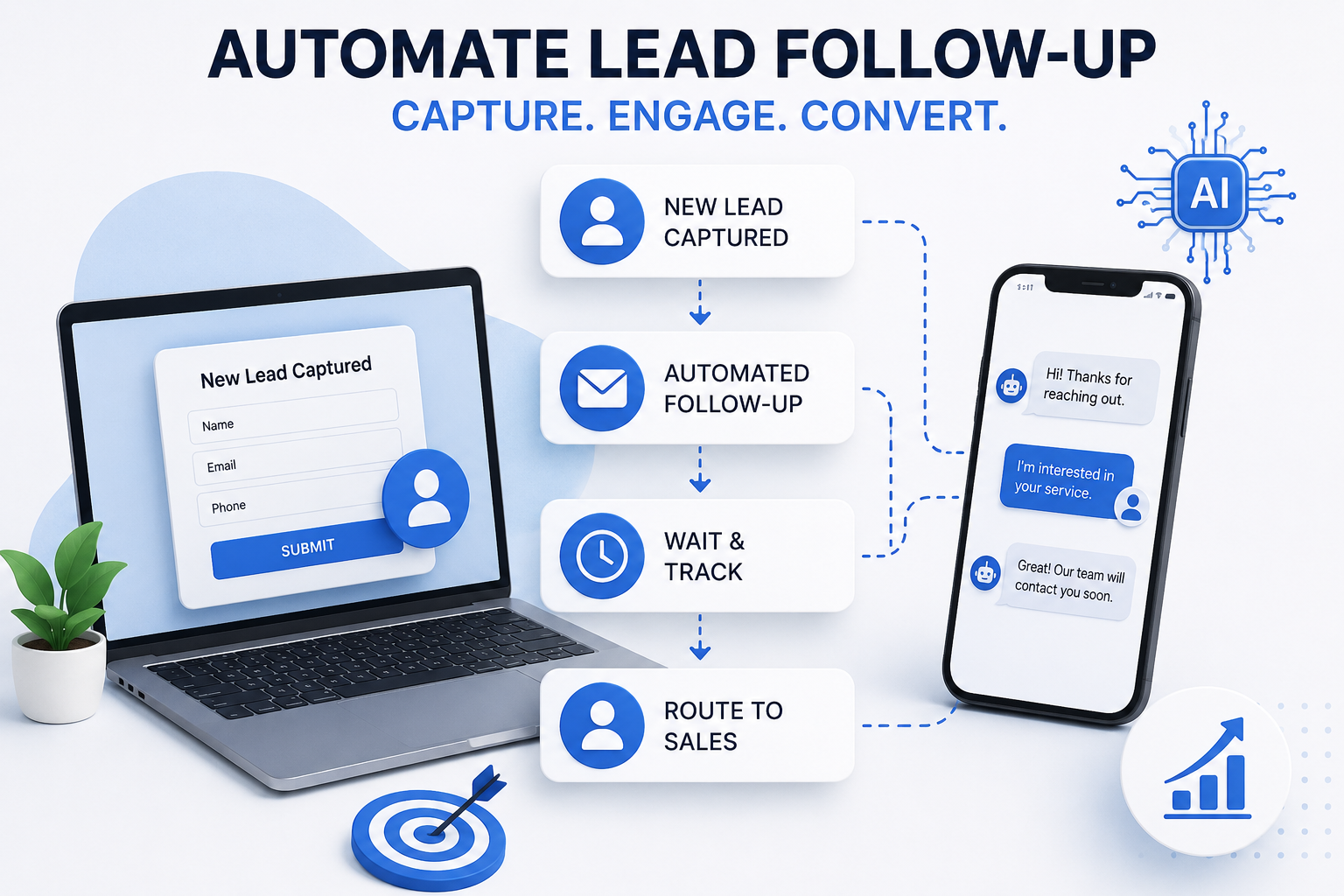
Automating lead follow-up means using software to send, track, and manage the messages that keep a new lead moving forward, instead of relying on someone remembering to reach out. It covers everything from a simple confirmation email to a full automated lead follow-up system built around AI and a CRM.
Here’s the thing most people miss. Automation doesn’t mean removing the human. It means the follow-up starts the second a lead comes in, and a person steps in once things get personal. That’s automate lead follow-up done right, not a bot pretending to be a person forever.
How Does an Automated Follow-Up System Work?
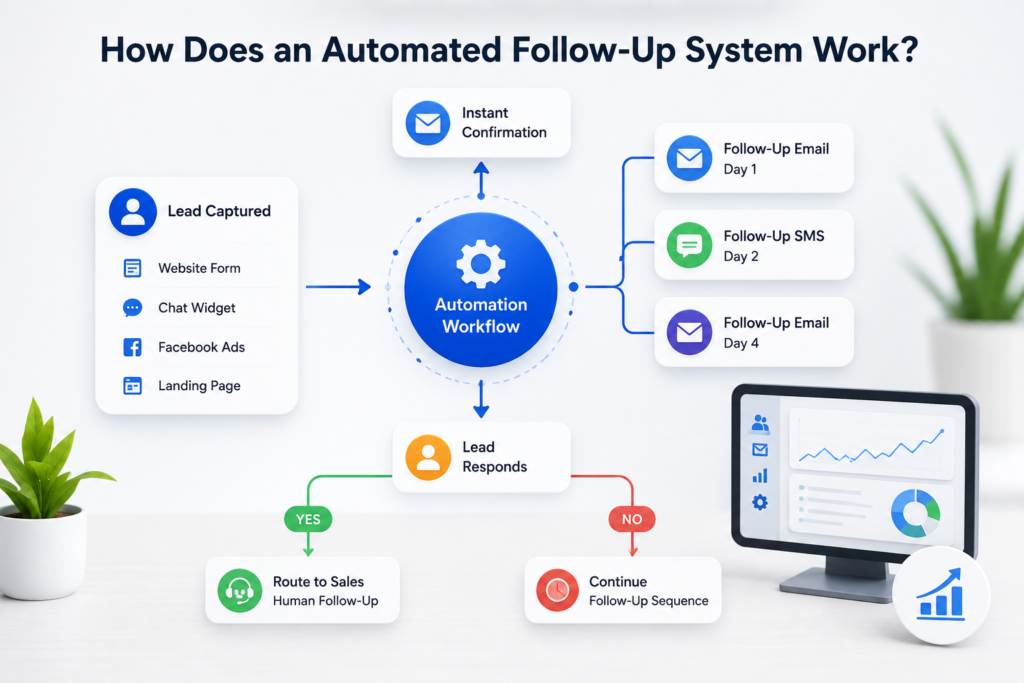
An automated follow-up system works off a simple loop. Something happens, a trigger fires, a message goes out, and the system waits for a reply before deciding what happens next.
Trigger, Message, Reply: The Basic Loop
A trigger could be a form submission, a lead entering your CRM, or someone downloading a resource. The workflow checks that trigger and fires the right message, whether that’s an email, a text, or a WhatsApp ping. If the lead replies, the sequence pauses and routes to a person. If not, it just moves to the next step in the follow-up.
That loop sounds simple written out, and it mostly is. What trips people up is building the logic so every lead follow doesn’t feel like a form letter.
Why Every Lead Needs a Follow-Up System, Not Just the Hot Ones
Every lead deserves a follow-up, not just the ones that look ready to buy today, because a prospect who isn’t ready this week might be ready next month if nobody drops the thread.
- A warm lead that doesn’t hear back within a day often assumes you’re not interested and moves on.
- Leads from an inbound lead source like a landing page tend to convert best in the first hour, then drop off fast.
- Leads that fall through the cracks usually aren’t lost because sales didn’t want them, they’re lost because nobody followed a process.
- Companies that stay consistent with follow-up close more deals over a quarter than ones that only chase the obvious buyers.
Harvard Business Review’s audit of over two thousand companies found that firms contacting a new lead within an hour were nearly seven times more likely to qualify that lead than ones who waited even a little longer. That gap only gets worse the longer someone waits, which is exactly why relying on memory instead of a system is such an expensive habit.
How to Build an Automated Lead Follow-Up System Step by Step
Want to build an automated lead follow-up from scratch. Here’s the process, roughly in order.
- Capture the lead properly, whether that’s a landing page form, a chat widget, or an ad lead form.
- Set your triggers so the moment a lead enters your CRM, the workflow fires without anyone touching it.
- Write the follow-up sequence itself, message by message, with a clear goal for each one.
- Route qualified replies to your sales team so a human takes over once the lead is actually engaged.
Step 1: Capture the Lead
Every lead capture point should feed straight into your CRM. A landing page that just emails a notification and stops there isn’t automation, it’s a half finished funnel.
Step 2: Set Your Triggers
This is where most systems either work or quietly fail. If your trigger only fires for form fills and misses leads coming from a WhatsApp chat or a Meta ad, half your pipeline never gets touched. Our GoHighLevel automation builds handle this by pulling every lead source into one pipeline so nothing depends on a person remembering to add it manually.
Step 3: Write the Sequence
A basic sequence might look like this. Confirmation message right away, something like “saw you downloaded our guide, here’s what to expect next.” Then a value message a day later. Then a direct offer a few days after that if there’s still no reply.
Step 4: Route to Sales
The system should hand off the second a lead replies with real interest. A good sales process treats automation as the warm up, not the whole show.
Follow-Up Sequence Templates You Can Use Today
Here’s a simple starting template most small businesses can adapt without much rework.
| Day | Channel | Message Goal |
|---|---|---|
| Day 0 | Email or SMS | Confirm receipt, set expectations |
| Day 1 | Email follow | Add value, answer a common question |
| Day 3 | SMS or WhatsApp | Short nudge, low pressure |
| Day 7 | Direct offer or booking link | |
| Day 14 | Final check in before moving to long term nurture |
The goal of a good follow-up email isn’t to sound clever, it’s to sound like a person who remembers the conversation. An AI email tool can help draft the first version fast, but it still needs a human pass to make sure it sounds like your business and not a template pulled from nowhere.
Using AI for Lead Follow-Up
AI helps lead follow-up mainly by handling the volume a human can’t keep up with, drafting messages, scoring leads, and flagging who needs attention first.
Lead Scoring and Prioritization with AI
Use AI to look at lead behavior, page visits, reply speed, budget signals, and score each one so your sales team knows who to call first instead of working the list top to bottom. Lead scoring like this makes lead prioritization a lot less guesswork heavy. AI tools can also draft a first pass at a personalized reply based on what the lead actually said, which saves a rep from starting from a blank page every time.
It’s not magic though. AI sales tools still get tone wrong sometimes, especially on anything emotional or unusual, so a light human review before sending catches most of the awkward misses.
Lead Nurture Automation vs One-Off Follow-Up
Lead nurture automation is different from a single follow-up message. Nurture is a longer game built around building trust over weeks or months, not just chasing a fast reply.
A lead nurture automation might send a useful tip every couple weeks with no pitch attached, slowly building trust until the lead becomes ready on their own timeline. One-off follow-up is more urgent and usually stops after a handful of messages if there’s no response. Most businesses need both running side by side, since a lead multiple touches away from buying still deserves attention even after the fast sequence ends.
Follow-Up Automation Tools Compared
| Tool | Key Feature | Best For |
|---|---|---|
| HubSpot | Full marketing automation and CRM in one | Mid size teams wanting an all in one platform |
| GoHighLevel | Custom pipelines, SMS and WhatsApp built in | Agencies and service businesses |
| ActiveCampaign | Strong email automation and segmentation | Ecommerce and content driven businesses |
There’s no single best follow-up tool for everyone. Choose the right one based on whether you need something plug and play like a tool like HubSpot, or a fully custom automation system built around your exact sales and marketing process. Implementing marketing automation always takes longer than the demo makes it look, so budget real setup time either way.
Follow-Up Automation for Small Business: Keeping It Simple
Follow-up automation doesn’t need to be complicated for small businesses to see results. A single confirmation message plus three follow-ups over two weeks beats manual work every time, even without a full CRM behind it.
Start with one channel, get it working, then expand. Trying to implement everything at once is usually how these projects stall halfway through. If you want help you automate this properly instead of piecing it together yourself, that’s exactly the kind of setup we build for clients.
Best Practices for Lead Follow-Up Automation
A few things separate a system that converts from one that just annoys people.
- Keep the first message fast, ideally within minutes, not hours.
- Make sure every lead gets the right message for where they are, not a generic blast.
- Use lead scoring so your team spends time on the leads most likely to close.
- Review lead data every month to catch messages that aren’t landing.
- Ensures every lead gets at least one human touch before the sequence ends completely.
Good lead management isn’t about sending more messages, it’s about making sure the right one lands at the right moment.
How Think AI Works Solves the Lead Follow-Up Problem
Most businesses that come to us aren’t missing leads. They’re missing the system that catches them. A lead comes in through a form, an ad, or a WhatsApp message, and it sits in an inbox until someone has a free minute. By then the moment’s gone.
We build the automated lead follow-up system around wherever your leads actually come from, not just one channel. That means the trigger fires the second a lead enters your CRM, whether that lead started on a landing page, a Meta ad, or a WhatsApp conversation.
Instant Response Without Adding Headcount
You don’t need a bigger sales team to follow up faster. You need the first message to go out automatically, then a person to step in once someone actually replies. That’s the balance we build every workflow around.
One Pipeline, Every Lead Source Connected
If leads come in through five different channels and land in five different places, half of them get missed by default. We pull every source into one pipeline through our GoHighLevel automation setup, so nothing depends on someone remembering to check a second inbox.
Follow-Up That Adapts to Each Lead
Not every lead should get the same sequence. A warm lead ready to book and a cold one that just downloaded a guide need different messages at different speeds. We build the logic so the system tells the difference, using lead scoring to decide who gets a fast direct offer and who goes into a longer nurture track.
Why Choose Think AI Works for Lead Follow-Up Automation
Plenty of agencies will set up a follow-up email and call it automation. We build the full loop, capture, trigger, sequence, and handoff, so nothing depends on a person remembering a step.
What we bring that’s harder to copy is the combination. We’re not just a CRM reseller and we’re not just a chatbot shop. We connect lead capture, WhatsApp and email follow-up, AI-assisted scoring, and CRM workflows into one system, which means fewer handoffs between tools and fewer places for a lead to get lost.
We also don’t hand you a finished automation and disappear. Sequences get reviewed and adjusted based on what’s actually converting, not left running on autopilot from day one. That ongoing part is where most DIY setups fall behind, since a sequence built once in January rarely still fits how leads behave by summer.
Benefits of Working With Think AI Works
The real value isn’t the automation itself, it’s what stops happening once it’s running.
- Leads stop sitting unanswered overnight or over a weekend, since the first message goes out the moment they come in.
- Your sales team spends time on leads that are actually engaged instead of working through a list in order.
- Follow-up stays consistent even during busy weeks, so nothing slips just because someone was slammed with other work.
- Reporting shows which messages in the sequence are actually landing, so the follow-up system gets better over time instead of staying static.
- You get one pipeline instead of leads scattered across email, WhatsApp, and ad platform inboxes.
Each of these ties back to the same problem this article opened with. A lead that goes cold overnight isn’t a sales problem, it’s a system problem, and that’s the part we’re built to fix.
Case Study: Fixing a Broken Follow-Up Process
The problem. A client running lead generation through Meta ads and a website form was losing a noticeable share of leads simply because responses depended on whoever was free that day. Leads that came in after hours or over the weekend often didn’t get a reply until the following business day, by which point several had already gone with a competitor.
The approach. We mapped every point a lead could enter the business, the ad form, the website, and WhatsApp enquiries, into a single CRM pipeline. From there we built an automated follow-up sequence that fired an instant confirmation message, followed by a short value message within a day, and a direct offer if there was still no reply after that.
The solution. Lead scoring was added so replies showing real intent got routed straight to the sales team, while lower intent leads moved into a longer nurture sequence instead of getting dropped entirely. Nothing sat waiting on a person to notice it.
Let’s take the busywork off your plate.
Book a free 30-minute call and we’ll map out exactly where automation can save you hours every week — no pressure, no jargon.
How Our Team Helps You Build and Run Follow-Up Sequences
Setting all of this up yourself is doable on a weekend if you’re patient. Getting it to run without babysitting every trigger and template usually takes longer than people expect on the first attempt.
We help businesses build and run follow-up sequences without the trial and error, connecting every lead source into one pipeline so nothing sits waiting in an inbox. If your leads are coming through ads, WhatsApp, or LinkedIn outreach, our AI chatbot for business setup ties the first response into the same system that handles everything after it.
Frequently Asked Questions
u003cstrongu003eWhat does it mean to automate lead follow-up?u003c/strongu003e
It means using software to trigger and send follow-up messages the moment a lead takes an action, instead of waiting for someone on the team to remember to reach out.
u003cstrongu003eHow fast should you follow up with a new lead?u003c/strongu003e
As fast as possible, ideally within minutes. Research shows the odds of qualifying a lead drop sharply the longer a business waits to make first contact.
u003cstrongu003eWhat is an automated lead follow-up system?u003c/strongu003e
It’s a workflow that captures a lead, sends a sequence of messages based on triggers, and routes engaged leads to a real person on the sales team.
u003cstrongu003eHow do you build a follow-up sequence for leads?u003c/strongu003e
Start with a confirmation message, add a value message a day or two later, then a direct offer, spacing each one out over one to two weeks.
u003cstrongu003eWhat is lead nurture automation?u003c/strongu003e
It’s a longer running sequence focused on building trust over time rather than pushing for an immediate reply, often used for leads who aren’t ready to buy yet.
u003cstrongu003eCan AI handle lead follow-up on its own?u003c/strongu003e
AI can draft messages and score leads well, but it still needs a human check for tone and context, especially once a lead replies with something specific.
u003cstrongu003eWhat is lead scoring and how does it help follow-up?u003c/strongu003e
Lead scoring ranks leads based on behavior and fit so your team knows who to follow up with first instead of working through the list in order.
u003cstrongu003eWhat’s the best tool for automated lead follow-up?u003c/strongu003e
It depends on your setup. HubSpot suits teams wanting an all in one platform, while GoHighLevel works well for agencies managing multiple channels and pipelines.
u003cstrongu003eHow many follow-up messages should a sequence have?u003c/strongu003e
Most sequences work well with four to six touches spread over about two weeks before shifting a lead into longer term nurture.
u003cstrongu003eDoes follow-up automation work for small businesses?u003c/strongu003e
Yes, even a basic setup with a confirmation message and two or three follow-ups outperforms manual, ad hoc follow-up for most small teams.
u003cstrongu003eWhat happens when a lead enters your CRM?u003c/strongu003e
A trigger should fire automatically, starting the first message in the sequence without anyone needing to manually add the lead to a list.
u003cstrongu003eHow do you stop leads from falling through the cracks?u003c/strongu003e
Set up triggers for every lead source, not just your main form, and route every reply to a person so nothing sits unanswered.
u003cstrongu003eShould follow-up automation replace a sales team?u003c/strongu003e
No, automation handles the repetitive early messages so the sales team can focus on leads that are actually engaged and ready to talk.
u003cstrongu003eCan you send personalized follow-up messages at scale?u003c/strongu003e
Yes, using lead data like name, source, and behavior to fill in a template, then having AI or a rep adjust tone for anything that needs a personal touch.
u003cstrongu003eHow does an automated follow-up system work step by step?u003c/strongu003e
A lead comes in, a trigger fires, the first message sends, and the system waits for a reply before deciding whether to continue the sequence or hand off to sales.
Final Thoughts
An automated lead follow-up system isn’t about replacing your sales team, it’s about making sure no lead sits waiting simply because nobody happened to see the notification in time. Start small with one sequence, watch how leads respond, then build out from there.
If you’d rather have this built and connected properly the first time instead of stitching it together yourself, reach out to our team and we’ll map out what a system would look like for your leads.