
Table of Contents
A dentist I worked with last year had a receptionist juggling three phone lines during lunch rush. Half the calls went to voicemail. By the time she called people back the slot they wanted was gone and some just booked with a different clinic instead.
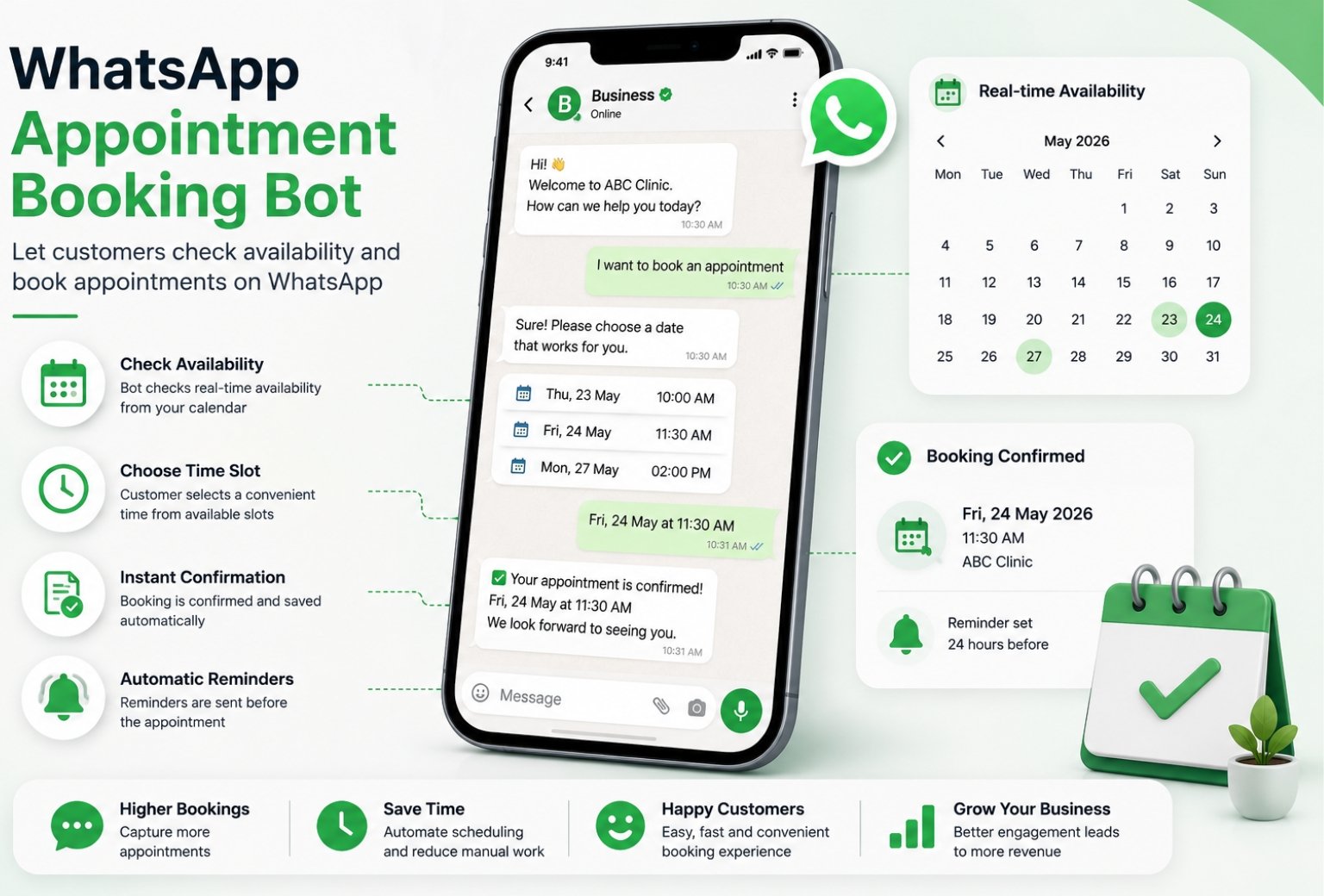
That’s the kind of lost revenue a whatsapp appointment booking bot fixes without anyone noticing the switch. This guide walks through how a booking bot actually works on whatsapp, how to set one up, and where a bot should hand things off to a real person. If you’re looking at Calendly, cal.com, or a native whatsapp bot and can’t decide, you’ll have a clear answer by the end.
What Is a WhatsApp Appointment Booking Bot?
A whatsapp appointment booking bot is a chatbot that lets customers check availability and book a time slot right inside a whatsapp conversation, without calling or filling out a web form. It runs on the whatsapp business platform and can be as simple as a menu of time slots or as advanced as an ai-powered assistant that reads natural language.
Here’s the thing. Most people picture a rigid menu bot when they hear this, and some are exactly that. But the better ones read what someone types, say something like “can I come in Thursday afternoon,” and match it to an open slot without forcing a rigid button flow. That’s the whatsapp appointment booking piece working the way it should.
How Does a WhatsApp Chatbot Book Appointments?
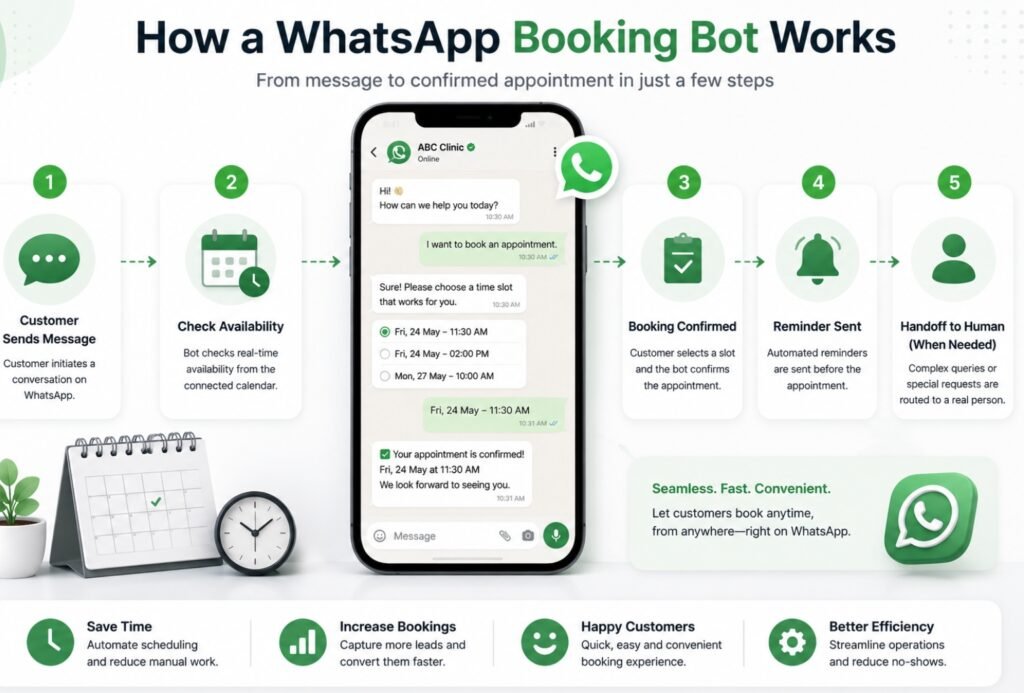
A whatsapp chatbot books appointments by running a short workflow behind the scenes. Someone messages in, the bot checks a connected calendar, offers open times, and locks the slot the second the customer confirms.
Scheduling Logic Behind the Bot
The scheduling logic is usually just a handful of rules stacked together. Check the calendar for open slots, filter out ones too close to now, offer two or three choices through quick replies, then write the booking back the moment someone picks one. Nothing magical about it, honestly, it’s just rules run in order every time instead of a human remembering them.
Natural language handling is what separates a decent bot from a frustrating one. If a customer types “next Tuesday morning” and the bot just replies “please select an option,” that’s a bad experience. A good whatsapp conversation flow reads intent first and only falls back to buttons when it genuinely can’t tell what someone wants.
Benefits of Letting Customers Book Appointments on WhatsApp Business
Letting customers book appointments on whatsapp business cuts down on missed calls and gives people a way to schedule at 11pm without anyone answering a phone.
- Booking happens the moment someone’s thinking about it, which means less lost revenue from people who forget to call back.
- Customer satisfaction goes up because there’s no hold music and no waiting for a callback.
- Operational efficiency improves since staff aren’t stuck manually checking a calendar between other tasks.
- Customer engagement stays higher because whatsapp has open rates most other channels can’t touch.
And to be fair, it’s not perfect for every business. A high end clinic that wants a personal phone call for new patients might find a fully automated flow feels a bit cold. That’s a real trade off worth thinking through before building anything.
WhatsApp Business Platform Features That Power Appointment Scheduling
The whatsapp business platform gives developers the building blocks for appointment scheduling through templates, interactive buttons, and api access to send and receive messages at scale.
Real Time Availability and Booking Links
Real-time syncing means the bot always shows what’s actually open, not a slot someone else grabbed five minutes ago. Most setups pull available time slots straight from the calendar and send a booking link or confirm the slot right inside the chat, so there’s no back and forth over email.
CRM and Automation Sync
Automation only pays off if the booking actually lands somewhere useful. Syncing bookings into a crm means every appointment, no show, and reschedule gets logged automatically instead of living in someone’s notebook. This is the exact layer our GoHighLevel automation work handles for clients who want bookings, follow ups, and pipeline stages all talking to each other.
How to Implement WhatsApp Appointment Booking Step by Step
Want to implement whatsapp appointment booking yourself. Here’s roughly how the process goes end to end.
- Connect your whatsapp business number to a platform that supports the api, not just the free app.
- Pick a scheduling tool, whether that’s calendly, cal.com, or a calendar built into your crm.
- Map your booking process. Greeting, availability check, confirmation, done.
- Build the confirmation message template and get it approved by Meta.
- Set up a followup flow for reminders and any post appointment message.
- Test the whole thing yourself a few times before real customers touch it.
Connect Calendly or Cal.com to WhatsApp
Both calendly and cal.com offer developer access that lets a whatsapp bot check availability and write bookings directly. Calendly leans toward simple team scheduling, while cal.com is more open and better suited to custom builds where you want full control over the booking link and branding.
Set Up Booking Confirmation and Reminder Flow
Once someone books, the bot should send appointments instantly as a confirmation message, then queue up a reminder for later. This is where most of the streamline effect happens, since customers stop needing to double check their own calendar.
WhatsApp Calendly Integration vs Native WhatsApp Booking Bot
| Option | Setup Effort | Cost | Best For |
|---|---|---|---|
| Calendly + WhatsApp | Low, mostly plug and play | Free to mid tier paid plans | Solo professionals, small teams |
| Cal.com + WhatsApp | Medium, more configuration | Free open source or paid hosted | Businesses wanting custom flows |
| Native WhatsApp booking bot | Higher, needs a build | Varies by provider | Businesses wanting full control and google calendar sync built in |
There’s no wrong answer here. A whatsapp calendly integration gets you moving fast if you just need basic scheduling. A native booking bot takes more setup but gives you the scheduling experience fully tailored to how your business actually books people in.
How to Reschedule or Cancel Appointments on WhatsApp
Customers can reschedule appointments or cancel appointments right inside the same whatsapp thread they booked in, usually by typing a quick command or tapping a button on the original confirmation message.
Managing bookings this way keeps everything in one conversation instead of forcing someone to call in just to move a time by twenty minutes. Confirm appointments changes instantly so both sides know the update actually went through, and update the calendar the moment it happens so nobody double books the old slot by mistake.
Automated Appointment Reminders on WhatsApp
Send appointment reminders automatically and no show rates drop, plain and simple. Most setups send reminders 24 hours out and again an hour or two before, though the exact timing depends on the type of business.
- Client appointments for service businesses do well with a same day reminder plus a short followup after.
- Patient scheduling for clinics often needs two touchpoints since medical no shows carry a bigger cost.
- Businesses that regularly schedule appointments with repeat customers can get away with a lighter single reminder.
Reminders and confirmations sent through whatsapp get read far faster than email, often within minutes, which is a big part of why the no show drop is so noticeable once businesses switch over.
WhatsApp Scheduling Bot Use Cases by Industry
Scheduling appointments over whatsapp looks a bit different depending on the industry.
Real Estate Viewings
Agents lose deals to whoever replies first, so a bot that checks availability and books viewing bookings the second someone messages makes a real difference. Our real estate automation builds are set up around exactly this kind of speed.
Restaurant Reservations
Reservation confirmations and reminders cut down on no shows during peak nights, which matters more than most owners realize until they see the numbers. Full details sit on our restaurant automation page.
Clinics and Patient Scheduling
Patient scheduling benefits from automated reminders the most out of any industry, since a missed appointment is lost revenue that’s hard to recover in the same week.
Service Businesses
Anyone booking recurring client appointments, from salons to consultants, sees the customer journey get shorter once booking, confirming, and rescheduling all happen without a phone call.
WhatsApp Bots vs Live Agents: When to Hand Off
Whatsapp bots handle the repeatable stuff well. Checking availability, sending a booking link, confirming a slot. But live agents still need to step in for anything unusual, a complaint, a special request, or someone who’s clearly frustrated and typing in circles.
The best whatsapp chatbots are built with an obvious exit ramp to a human, not a maze that traps people. If your bot can’t answer something after two tries, it should just say so and hand the thread over.
How Think AI Works Solves the Lead Follow-Up Problem
Most businesses that come to us aren’t missing leads. They’re missing the system that catches them. A lead comes in through a form, an ad, or a WhatsApp message, and it sits in an inbox until someone has a free minute. By then the moment’s gone.
We build the automated lead follow-up system around wherever your leads actually come from, not just one channel. That means the trigger fires the second a lead enters your CRM, whether that lead started on a landing page, a Meta ad, or a WhatsApp conversation.
Instant Response Without Adding Headcount
You don’t need a bigger sales team to follow up faster. You need the first message to go out automatically, then a person to step in once someone actually replies. That’s the balance we build every workflow around.
One Pipeline, Every Lead Source Connected
If leads come in through five different channels and land in five different places, half of them get missed by default. We pull every source into one pipeline through our GoHighLevel automation setup, so nothing depends on someone remembering to check a second inbox.
Follow-Up That Adapts to Each Lead
Not every lead should get the same sequence. A warm lead ready to book and a cold one that just downloaded a guide need different messages at different speeds. We build the logic so the system tells the difference, using lead scoring to decide who gets a fast direct offer and who goes into a longer nurture track.
Why Choose Think AI Works for Lead Follow-Up Automation
Plenty of agencies will set up a follow-up email and call it automation. We build the full loop, capture, trigger, sequence, and handoff, so nothing depends on a person remembering a step.
What we bring that’s harder to copy is the combination. We’re not just a CRM reseller and we’re not just a chatbot shop. We connect lead capture, WhatsApp and email follow-up, AI-assisted scoring, and CRM workflows into one system, which means fewer handoffs between tools and fewer places for a lead to get lost.
We also don’t hand you a finished automation and disappear. Sequences get reviewed and adjusted based on what’s actually converting, not left running on autopilot from day one. That ongoing part is where most DIY setups fall behind, since a sequence built once in January rarely still fits how leads behave by summer.
Benefits of Working With Think AI Works
The real value isn’t the automation itself, it’s what stops happening once it’s running.
- Leads stop sitting unanswered overnight or over a weekend, since the first message goes out the moment they come in.
- Your sales team spends time on leads that are actually engaged instead of working through a list in order.
- Follow-up stays consistent even during busy weeks, so nothing slips just because someone was slammed with other work.
- Reporting shows which messages in the sequence are actually landing, so the follow-up system gets better over time instead of staying static.
- You get one pipeline instead of leads scattered across email, WhatsApp, and ad platform inboxes.
Each of these ties back to the same problem this article opened with. A lead that goes cold overnight isn’t a sales problem, it’s a system problem, and that’s the part we’re built to fix.
Case Study: Fixing a Broken Follow-Up Process
The problem. A client running lead generation through Meta ads and a website form was losing a noticeable share of leads simply because responses depended on whoever was free that day. Leads that came in after hours or over the weekend often didn’t get a reply until the following business day, by which point several had already gone with a competitor.
The approach. We mapped every point a lead could enter the business, the ad form, the website, and WhatsApp enquiries, into a single CRM pipeline. From there we built an automated follow-up sequence that fired an instant confirmation message, followed by a short value message within a day, and a direct offer if there was still no reply after that.
The solution. Lead scoring was added so replies showing real intent got routed straight to the sales team, while lower intent leads moved into a longer nurture sequence instead of getting dropped entirely. Nothing sat waiting on a person to notice it.
Let’s take the busywork off your plate.
Book a free 30-minute call and we’ll map out exactly where automation can save you hours every week — no pressure, no jargon.
How to Automate Your WhatsApp Booking Bot with ThinkAIWorks
Building this yourself is doable, but getting the scheduling logic, reminders, and crm sync all working together end-to-end usually takes longer than people expect on the first try.
We build this kind of setup as part of our AI chatbot for business service, connecting whatsapp automation to whatever calendar and crm you’re already running so bookings, reminders, and follow ups just happen in the background.
Frequently Asked Questions
What is a WhatsApp appointment booking bot?
It’s a chatbot on WhatsApp that lets customers check availability and book a time slot directly in the chat, without calling or filling out a form.
How do I set up appointment booking on WhatsApp?
Connect a whatsapp business number to a platform with api access, link it to a calendar tool like Calendly or Cal.com, then build out your confirmation and reminder messages.
Can I connect Calendly to WhatsApp?
Yes, Calendly’s developer API lets a whatsapp bot check availability and create bookings directly, which is one of the fastest ways to get started.
Does WhatsApp have a built in booking system?
No, WhatsApp itself doesn’t include native scheduling. You need a connected tool like Calendly, Cal.com, or a custom bot to handle the actual booking logic.
How do automated appointment reminders work on WhatsApp?
The bot sends a message a set time before the appointment, usually 24 hours and again an hour or two out, pulled straight from the original booking data.
Can customers reschedule appointments through WhatsApp?
Yes, most booking bots let someone reschedule or cancel right inside the same conversation thread they used to book originally.
Can customers cancel appointments on WhatsApp?
Yes, usually with a quick reply or command, and the calendar updates automatically so the slot opens back up for someone else.
Is a WhatsApp booking bot free?
The whatsapp business app itself is free, but real booking automation through the api usually comes with a small platform fee plus Meta’s messaging costs.
What’s the difference between Calendly and a WhatsApp booking bot?
Calendly is a scheduling tool on its own, while a whatsapp booking bot brings that scheduling directly into a chat customers are already using, often through a Calendly or Cal.com integration behind the scenes.
Can I sync WhatsApp bookings with Google Calendar?
Yes, most scheduling tools connected to whatsapp support a google calendar sync so bookings show up automatically on your existing calendar.
How do I reduce no shows using WhatsApp reminders?
Send a reminder a day before and a shorter one closer to the appointment time. Businesses that do this consistently see no show rates drop noticeably within the first month.
Can a WhatsApp bot check real time availability?
Yes, a properly connected bot pulls live data from the calendar so it never offers a slot that’s already taken.
Is WhatsApp appointment booking good for clinics and patient scheduling?
Yes, patient scheduling is one of the strongest use cases since missed medical appointments are costly and reminders through whatsapp get seen fast.
When should a booking bot hand off to a live agent?
Whenever a request falls outside normal scheduling, like a complaint or a special case the bot can’t resolve after a couple of attempts.
How much does it cost to implement WhatsApp appointment booking?
Costs vary based on message volume and the platform used, but most small businesses can get a working setup running for well under a few hundred dollars a month.
Final Thoughts
A whatsapp booking bot isn’t about replacing the front desk, it’s about catching the bookings that would’ve slipped through during lunch rush or after hours. Start with a simple confirmation and reminder flow, then build toward a full booking bot once you know what your customers actually ask for.
If you’d rather have this built and connected to your calendar properly the first time, reach out to our team and we’ll map out what it looks like for your business.