
Table of Contents
If you have tried to figure out WhatsApp Business API pricing this year and walked away more confused than when you started you are not alone. Meta changed the rules in 2026 and a lot of the pricing pages still floating around the internet are talking about a system that no longer exists. The old conversation based pricing is gone. What you are dealing with now is a per-message model and it changes how you budget for everything from order updates to marketing blasts.
This guide walks through exactly how WhatsApp business api pricing works right now. You will get the real cost per message by category real examples with numbers attached and a plain answer on what a business solution provider adds on top of Meta’s own rates. If you run automated campaigns at any real volume this is the kind of thing you want locked down before you scale further, and it is part of why we built our own whatsapp automation for business setup around getting these numbers right from day one.
What Is WhatsApp Business API Pricing
WhatsApp business api pricing is the cost Meta charges businesses to send messages through the WhatsApp Business Platform, based on the type of message sent and where the recipient is located. It is separate from the free WhatsApp Business App, which stays free for basic manual use. Once you move into automated sending through the api, meta charges apply per message and the rate depends entirely on the message category.
This is where a lot of business owners get tripped up. They assume pricing is one flat number. It is not. A marketing message to a customer in one country can cost several times more than a utility message to a customer somewhere else, and that gap alone can throw off a monthly budget if nobody accounts for it early.
How WhatsApp Business API Pricing Works in 2026
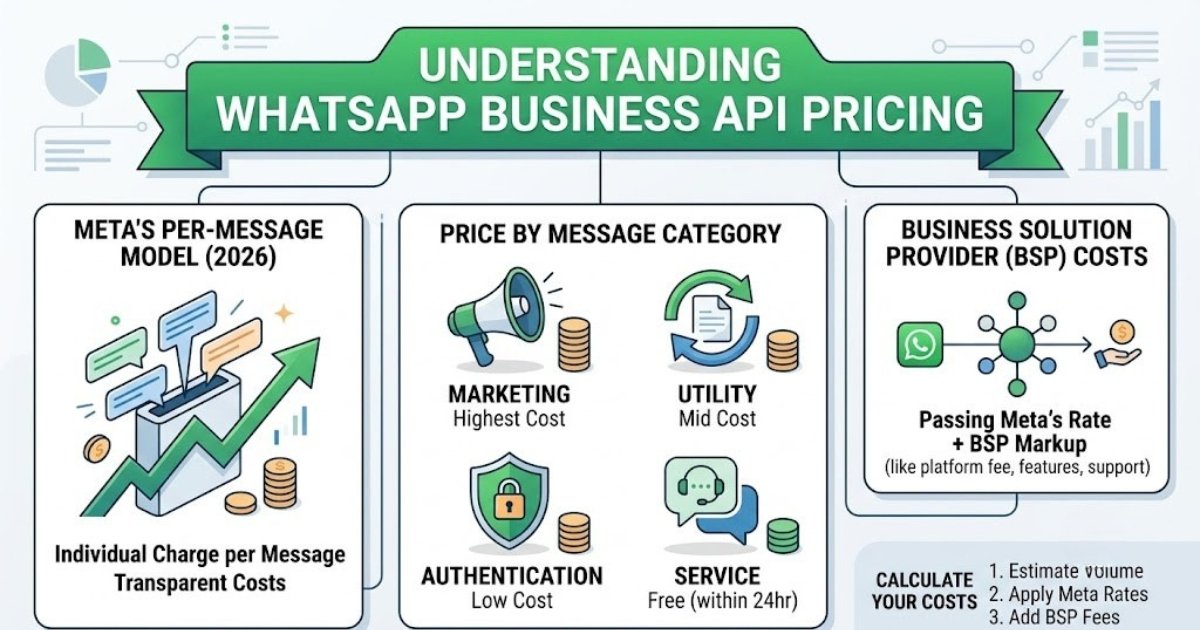
WhatsApp business api pricing works on a per-message basis in 2026, meaning you pay for each message sent rather than paying once per open conversation window. Meta rolled this change out to make billing more predictable and to stop businesses from bundling unrelated messages into a single paid conversation just to save money.
Conversation Based Pricing vs Per-Message Pricing
For years WhatsApp ran on conversation based pricing. You opened a 24 hour conversation window with a customer and every message sent inside that window, marketing or service, fell under one price. Businesses shifted from conversation-based pricing to per-message pricing this year and honestly it makes cost tracking a lot cleaner even if the sticker price on individual messages can look higher at first glance.
Under the new per-message pricing model each message is billed on its own. A reminder sent an hour after a marketing message is priced separately instead of riding along in the same window. For a business running high message count campaigns this means your cost per 24-hour conversation window no longer applies the same way, and you need to think in message volume instead of conversation volume.
Why Meta Changed the Pricing Model
Meta charges per message now mainly because the old system made it hard for both Meta and businesses to predict real usage. Bundling encouraged businesses to cram extra messages into an already open window instead of sending only what the customer actually needed. The new pricing updates push toward more transparent pricing, where every message has a clear cost tied to it and nothing gets hidden inside a conversation fee.
WhatsApp API Cost by Message Category
WhatsApp api cost depends on the message category, with marketing messages typically costing the most, followed by utility and authentication messages, while service messages inside the free customer support window usually cost nothing. Meta groups every message into one of these buckets and the category you pick when sending determines the rate you pay.
Marketing Message Cost
Whatsapp marketing message cost applies to any message with promotional intent, this includes product announcements, discount codes, and anything you would run through a whatsapp ad campaign to bring someone back to your storefront. This is the most expensive category by a noticeable margin, and pricing varies by message category and recipient country, so a marketing message sent to a customer in the US will not cost the same as one sent to a customer in India.
Utility and Authentication Message Cost
Utility and authentication messages cover order confirmations, shipping updates, appointment reminders, and one time passwords. These sit in the middle of the pricing scale, well below marketing but not free. An authentication message, the kind used for login codes, is usually the cheapest paid category because it serves a narrow functional purpose rather than trying to sell anything.
Service Message Cost and the Customer Service Window
Service messages sent within 24 hours of a customer reaching out first are typically free. This is the 24-hour customer service window and it exists so businesses can respond to a customer question without getting billed for a normal support reply. Step outside that window and your next message needs to use a template, which puts it back into a paid category.
Table 1: WhatsApp Message Category Cost Overview
| Message Category | Purpose | Relative Cost | Free Window Eligible |
|---|---|---|---|
| Marketing | Promotions, offers, ads follow up | Highest | No |
| Utility | Order updates, reminders, receipts | Mid | No |
| Authentication | OTPs, login codes | Low to Mid | No |
| Service | Customer replies within 24 hours | Free | Yes |
WhatsApp API Cost Per Message Real Examples
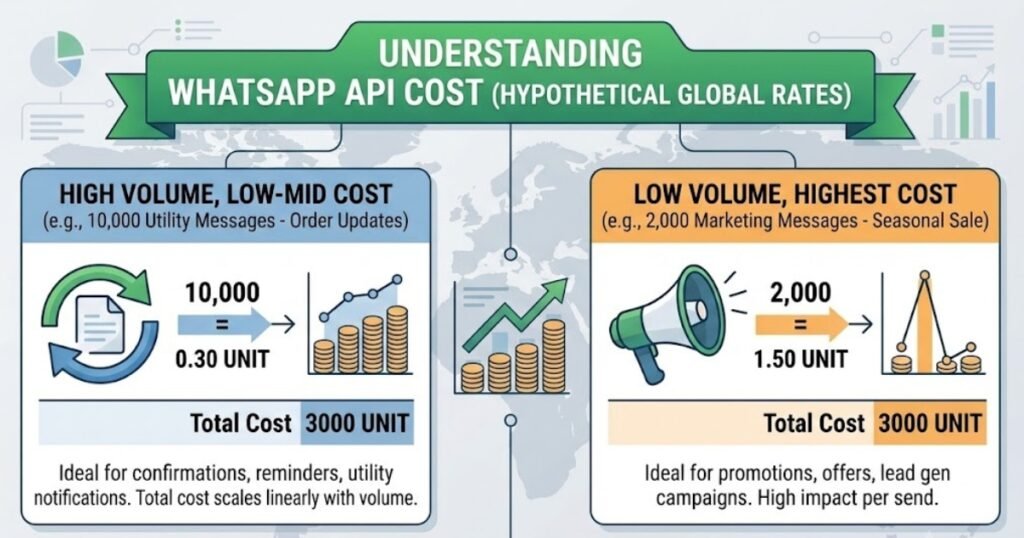
Whatsapp api cost per message is best understood with an actual scenario rather than a rate sheet. Say you send 10000 utility messages a month for order tracking and 2000 marketing messages promoting a seasonal sale. Your message costs will lean heavily on that marketing batch even though it is the smaller group, because meta’s per-message rate for marketing sits well above utility pricing.
Here is a rough way to picture it without pretending to give exact global rates, since per-message rates shift by country and Meta updates them from time to time. If utility runs you a small fraction of a dollar per message and marketing runs several times that per message, your 2000 marketing sends could end up costing close to what your entire utility batch costs, even at five times the message count. That is the kind of gap that catches businesses off guard when nobody has mapped out message count against category ahead of time.
WhatsApp BSP Markup
A whatsapp bsp markup is the extra fee a Business Solution Provider adds on top of Meta’s base per-message rate in exchange for platform access, automation tools, and support. You cannot connect straight to the WhatsApp Business Platform without going through an approved business solution provider, so this markup is close to unavoidable unless you build and maintain your own direct api access, which most businesses do not have the engineering resources for.
Markup structures differ a lot from one provider to the next. Some charge a flat monthly platform fee plus Meta’s raw per-message cost passed through unchanged. Others fold everything into one blended rate so you never see Meta’s actual number separately. Neither approach is wrong, but you should know which one you are getting before you sign anything, because a blended rate can hide a markup that would otherwise stand out on a pricing table.
Free Messages and the Free Entry Point
WhatsApp does offer a free entry point through the customer service window, along with a limited allowance for certain conversation types, but these free messages are not unlimited and do not apply once you start running planned campaigns. The free-form message option inside that 24 hour window is genuinely useful for support teams answering real questions, and it is one of the few places in this whole pricing structure where cost simply is not a factor.
Outside that window everything reverts to paid templates. The free whatsapp business app itself stays free to download and use manually, but that has nothing to do with api pricing once you are automating anything at scale.
WhatsApp Business App vs WhatsApp Business Platform Cloud API
The WhatsApp Business App is free and built for one person managing a phone manually, while the WhatsApp Business Platform, often called the cloud api, is the paid version built for automated high volume messaging. If you are still using whatsapp business app for anything beyond a handful of daily chats you are almost certainly leaving efficiency on the table.
The cloud api lets you connect chatbots, CRMs, and booking systems directly into your whatsapp platform, which is a different world from tapping out replies on a phone. Every whatsapp user your business messages through the api counts toward your message volume and cost, so this is the point where pricing actually becomes something you manage rather than something you ignore.
How to Calculate Your Monthly WhatsApp API Costs
You calculate monthly WhatsApp api costs by estimating message volume per category, applying the per-message rate for each category, and adding your business solution provider’s fees on top. It sounds simple written out like that, and honestly the math itself is simple. The part people skip is the estimating.
Step 1: Estimate Message Volume by Category
Pull your last three months of message template sends if you have them, split by marketing, utility, and authentication. If you do not have that data yet, use your customer count and multiply by how often you realistically message each customer per month.
Step 2: Apply Per-Message Rates
Multiply each category’s message count by its current rate. Rates get updated by Meta from time to time, so pull current numbers from Meta’s own pricing pages rather than relying on a number you saw in a blog post from last year, this one included.
Step 3: Add BSP Fees
Add whatever flat or percentage fee your provider charges on top. This is the step people forget most often, and it is usually where the real surprise in the final bill shows up.
How AI Agents Affect Your WhatsApp API Pricing
An ai agent handling customer replies inside the free service window does not change your WhatsApp api pricing directly, but it changes your message volume and category mix, which absolutely affects your bill. A bot that closes a conversation fast keeps more messages inside the free per conversation window instead of pushing customers past 24 hours and forcing a paid template restart.
This is one of the more overlooked levers in cost control. A slow support process where a customer messages, waits, then messages again the next day forces a new paid message every time the window resets. An automated flow that responds in minutes keeps everything inside the free zone far more often, and that alone can shave a real chunk off a monthly bill for any business handling decent customer messages volume. This is exactly the kind of setup we build through our ai chatbot for business work, tuned around keeping replies fast enough that the free window actually gets used.
Choosing the Right WhatsApp Pricing Model for Your Business
The right approach depends on the message category mix your business actually sends, not on some general best practice that applies to everyone equally. A retailer running frequent promotions will lean hard into marketing costs and needs a provider with strong marketing rate transparency. A logistics or service business sending mostly order updates will spend more time in utility pricing and cares more about reliable delivery than promotional reach.
Whatsapp costs vary by message category and there is no single pricing model that fits every business type. What matters is knowing your own send pattern before you commit to a provider, because switching later after locking into templates and workflows is a lot more painful than getting the estimate right up front.
How Think AI Works Solves the Lead Follow-Up Problem
Most businesses that come to us aren’t missing leads. They’re missing the system that catches them. A lead comes in through a form, an ad, or a WhatsApp message, and it sits in an inbox until someone has a free minute. By then the moment’s gone.
We build the automated lead follow-up system around wherever your leads actually come from, not just one channel. That means the trigger fires the second a lead enters your CRM, whether that lead started on a landing page, a Meta ad, or a WhatsApp conversation.
Instant Response Without Adding Headcount
You don’t need a bigger sales team to follow up faster. You need the first message to go out automatically, then a person to step in once someone actually replies. That’s the balance we build every workflow around.
One Pipeline, Every Lead Source Connected
If leads come in through five different channels and land in five different places, half of them get missed by default. We pull every source into one pipeline through our GoHighLevel automation setup, so nothing depends on someone remembering to check a second inbox.
Follow-Up That Adapts to Each Lead
Not every lead should get the same sequence. A warm lead ready to book and a cold one that just downloaded a guide need different messages at different speeds. We build the logic so the system tells the difference, using lead scoring to decide who gets a fast direct offer and who goes into a longer nurture track.
Why Choose Think AI Works for Lead Follow-Up Automation
Plenty of agencies will set up a follow-up email and call it automation. We build the full loop, capture, trigger, sequence, and handoff, so nothing depends on a person remembering a step.
What we bring that’s harder to copy is the combination. We’re not just a CRM reseller and we’re not just a chatbot shop. We connect lead capture, WhatsApp and email follow-up, AI-assisted scoring, and CRM workflows into one system, which means fewer handoffs between tools and fewer places for a lead to get lost.
We also don’t hand you a finished automation and disappear. Sequences get reviewed and adjusted based on what’s actually converting, not left running on autopilot from day one. That ongoing part is where most DIY setups fall behind, since a sequence built once in January rarely still fits how leads behave by summer.
Benefits of Working With Think AI Works
The real value isn’t the automation itself, it’s what stops happening once it’s running.
- Leads stop sitting unanswered overnight or over a weekend, since the first message goes out the moment they come in.
- Your sales team spends time on leads that are actually engaged instead of working through a list in order.
- Follow-up stays consistent even during busy weeks, so nothing slips just because someone was slammed with other work.
- Reporting shows which messages in the sequence are actually landing, so the follow-up system gets better over time instead of staying static.
- You get one pipeline instead of leads scattered across email, WhatsApp, and ad platform inboxes.
Each of these ties back to the same problem this article opened with. A lead that goes cold overnight isn’t a sales problem, it’s a system problem, and that’s the part we’re built to fix.
Case Study: Fixing a Broken Follow-Up Process
The problem. A client running lead generation through Meta ads and a website form was losing a noticeable share of leads simply because responses depended on whoever was free that day. Leads that came in after hours or over the weekend often didn’t get a reply until the following business day, by which point several had already gone with a competitor.
The approach. We mapped every point a lead could enter the business, the ad form, the website, and WhatsApp enquiries, into a single CRM pipeline. From there we built an automated follow-up sequence that fired an instant confirmation message, followed by a short value message within a day, and a direct offer if there was still no reply after that.
The solution. Lead scoring was added so replies showing real intent got routed straight to the sales team, while lower intent leads moved into a longer nurture sequence instead of getting dropped entirely. Nothing sat waiting on a person to notice it.
Frequently Asked Questions
u003cstrongu003eHow much does WhatsApp Business API cost in 2026?u003c/strongu003e
It depends entirely on your message category mix and country. Marketing messages cost the most, utility and authentication sit in the middle, and service messages inside the free window cost nothing. There is no single flat number that applies to every business.
u003cstrongu003eWhat is WhatsApp per-message pricing?u003c/strongu003e
It is the current billing model where each message sent through the api is charged individually based on its category, replacing the older conversation based system where an entire 24 hour window was billed as one unit.
u003cstrongu003eHow is WhatsApp marketing message cost calculated?u003c/strongu003e
Marketing message cost is based on the message category and the recipient’s country, with marketing sitting at the top of the pricing scale compared to utility and authentication messages.
u003cstrongu003eWhat is the difference between WhatsApp Business App and API pricing?u003c/strongu003e
The WhatsApp Business App is free for manual one to one messaging. The WhatsApp Business Platform, the api version, charges per message once you move into automated or high volume sending.
u003cstrongu003eAre there free WhatsApp Business API messages?u003c/strongu003e
Yes, service messages sent within the 24 hour customer service window are typically free, since that window exists specifically for responding to a customer who reached out first.
u003cstrongu003eWhat is a WhatsApp BSP markup?u003c/strongu003e
It is the additional fee a Business Solution Provider charges on top of Meta’s base per-message rate, covering platform access, tools, and support needed to actually use the api.
u003cstrongu003eDo I need a Business Solution Provider to use the API?u003c/strongu003e
For almost every business, yes. Direct access without going through an approved provider requires engineering resources most companies do not have in house.
u003cstrongu003eWhat are utility and authentication messages?u003c/strongu003e
Utility messages cover things like order updates and appointment reminders. Authentication messages cover login codes and one time passwords. Both are priced below marketing messages.
u003cstrongu003eHow long is the WhatsApp free customer service window?u003c/strongu003e
24 hours from the customer’s last message. Once that window closes a new message to that customer needs to go out as a paid template.
u003cstrongu003eWhy did WhatsApp move away from conversation-based pricing?u003c/strongu003e
Meta shifted to per-message pricing to make billing more transparent and stop businesses from bundling unrelated messages into a single paid window just to reduce cost.
u003cstrongu003eDoes message cost vary by recipient country?u003c/strongu003e
Yes. The same message category can carry a different rate depending on where the recipient is located, so a marketing message sent globally will not cost the same everywhere.
u003cstrongu003eHow can I reduce my WhatsApp API costs?u003c/strongu003e
Keep more conversations inside the free service window by responding fast, choose utility or authentication categories over marketing wherever it genuinely fits the message, and get clear on your BSP’s markup structure before your message volume scales up.
Final Thoughts
WhatsApp business api pricing in 2026 comes down to three things, your message category mix, your recipient countries, and the markup your business solution provider adds on top of Meta’s base rate. None of that is complicated once you have the numbers in front of you, but almost nobody sits down and actually maps it out before they start sending at volume.
If you want help getting your message categories mapped correctly before you scale sending, or you want a setup that keeps more replies inside that free service window through faster automated responses, our team handles this through our whatsapp automation for business service, and for businesses that also want lead capture built into the same flow our ai lead generation work ties directly into it. You can reach out through our contact page and we will walk through your actual send pattern with you before recommending anything.
Sources
- Meta official WhatsApp Business Platform pricing documentation
- Meta for Developers changelog on the 2026 per-message pricing update