Table of Contents
Most agencies open a new GoHighLevel account, click through the first five screens, and start building funnels the same day. That feels productive. It also means the account structure, the phone system, and the automation logic all get bolted on later, usually right when a client is watching.
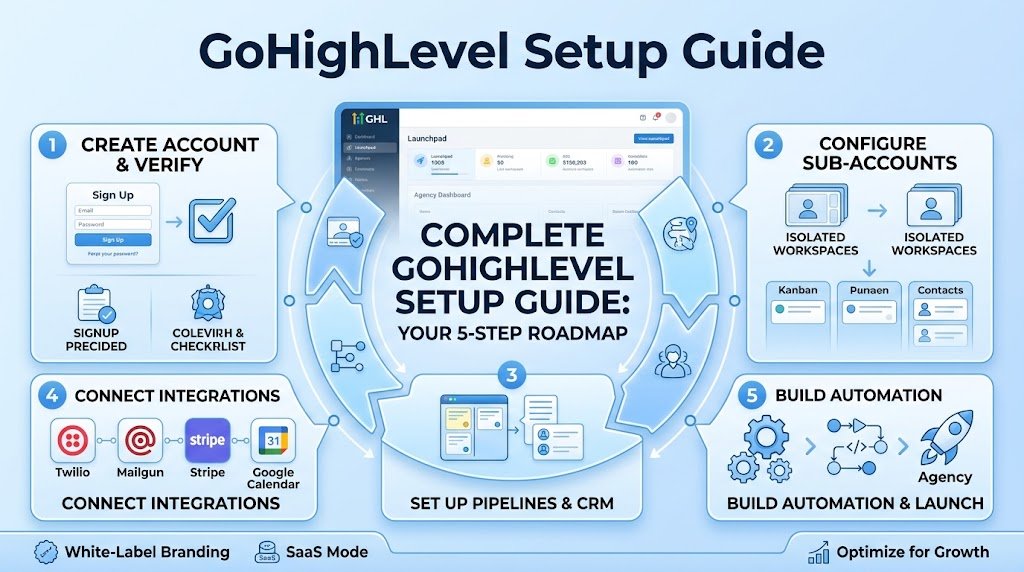
This gohighlevel setup guide walks through the order that actually holds up: account structure first, then CRM and pipeline, then calendar and phone, then automation, then the polish that makes an agency look like it knows what it’s doing. If you’re building your own ghl account or setting one up for a client, this is the sequence that saves you a rebuild in month three.
If you’d rather skip the DIY setup entirely, our GoHighLevel automation agency team builds this out for clients directly, but the steps below work whether you’re doing it yourself or just want to understand what’s happening under the hood.
What Is GoHighLevel? Getting Started With the SaaS Platform
GoHighLevel is a sales and marketing platform built for agencies that want one system instead of five. It combines CRM, funnels, calendars, phone and SMS, and workflow automation under a single login, and it lets agencies resell it under their own brand through saas mode.
For getting started purposes, think of it less as one app and more as a toolkit. You’re not just picking a CRM. You’re setting up the system that will run a client’s entire sales process, from the first form submission to the invoice.
That’s a different kind of setup than most people expect. A basic CRM signup takes five minutes. A real gohighlevel setup takes a few hours if you do it right, and a few weeks of small fixes if you don’t.
GoHighLevel Account Structure: Sub-Accounts and SaaS Mode
Here’s the part that trips people up early. Your main gohighlevel accounts login is the agency level. Every client gets their own sub-account underneath it, and each sub-account behaves like its own isolated workspace with its own pipeline, calendar, and phone number.
Agency Account vs Sub-Account: What’s the Difference
The agency account is where you manage billing, snapshots, and saas configurator settings. A sub-account is where the actual client work happens, meaning their leads, their calendar, their automation. Mixing the two up, building client workflows inside the agency account by mistake, is one of the more common early errors.
Naming Conventions for Multi-Client Sub-Accounts
If you’re running more than two or three clients, naming conventions matter more than people think. Something like “ClientName – Service Type” keeps your sub-account list scannable once you hit ten or fifteen accounts. We’ve seen agencies wait until account twenty to fix this, and by then it’s a two hour cleanup job instead of a five minute decision made on day one.
Step-by-Step GoHighLevel Setup Guide
This is the actual build order. Skip a step here and you’ll be back to fix it once real leads start coming in.
Create Your Agency and First Sub-Account
Start at the agency level, confirm your billing and pricing tiers, then create your first sub-account. If you’re on a starter plan, you’ll have fewer sub-account slots than a full agency plan, so it’s worth checking your limits before you promise a client a launch date.
Domain Authentication and Email Sending Setup
Before you send a single email, set up domain authentication. GoHighLevel uses mailgun on the backend for email sending, and without proper domain authentication your welcome email and every automated email after it lands in spam. This step gets skipped constantly because it feels technical, but it takes ten minutes and it decides whether your email usage actually works.
Connect a Twilio Account for SMS and Calls
Your phone system runs through a connected twilio account. You’ll need to buy a number, verify it, and link billing so sms messages and calls actually send. Without this step your calendar reminders and missed-call automations simply won’t fire, even if the workflow looks correct on screen.
Import a Snapshot or Account Template
A snapshot is a pre-built account template, funnels, pipelines, workflows and all, that you import instead of building from scratch. Account templates are the single biggest time saver in this whole process. Building a pipeline and three workflows from nothing takes half a day. Importing a snapshot and adjusting it takes twenty minutes.
Custom Fields and Basic Billing Setup
Custom fields let you capture the specific data a client’s sales process actually needs, not just name and email. Set these up before you build your pipeline, because retrofitting fields into an existing workflow means going back through every automation that references them.
Setting Up Your CRM Pipeline and Funnel
Your crm and pipeline setup is where the sales process becomes visible. Each stage in the pipeline should represent a real, observable moment, not a wish. “New Lead” to “Contacted” to “Booked” to “Won” is a real pipeline. “Interested” to “Very Interested” is not.
Building a Sales Pipeline Stage by Stage
Every new lead that comes through a form submission should land in the first stage automatically. From there, workflow automation should move them based on actual triggers, a booked call, a reply, a tag, not manual dragging by a sales rep who forgot to update it.
Funnel vs Website: When to Use Each
A funnel is built for one job, get a form submission or a booking, nothing else competing for attention. A full website is better when a client needs to explain a broader use cases list or build general trust. Most agencies end up using both, a funnel for lead capture and a website for the rest of the story.
Snapshot Setup: Fast-Track Your GHL Onboarding Steps
If your ghl onboarding steps still take a full day per client, a snapshot fixes that. Build the pipeline, workflows, and calendar once for a niche, real estate, restaurants, whatever you serve, then save it as a template and import it for every new sub-account.
This is also where diy setup and done-for-you setup start to diverge. A well-built snapshot cuts client onboarding from a full day down to under an hour. Our AI lead generation agency work often plugs directly into a snapshot like this, so the lead capture and the nurture sequence are ready before the first ad even goes live.
Calendar and Booking Setup
Calendar setup decides whether appointment booking actually converts or just sits there. Set your availability windows realistically, connect it to the right calendar type (round robin for teams, single for solo operators), and confirm time zones before you go live. Wrong time zones are a quiet killer of booked calls.
Reducing No-Shows With Automated Reminders
Appointment reminders through sms and voicemail cut no-shows noticeably, and most agencies undersell this. A simple sequence, confirmation immediately, reminder the day before, reminder an hour before, is enough for most businesses. Add a voicemail drop on the morning-of reminder if the client’s show-up rate is still rough after the sms sequence alone.
Phone System Setup: SMS, Voicemail, and Missed-Call Automation
Your phone system setup covers more than just making calls. Email and sms both run through the same automation engine, so a missed-call can trigger an automatic text back within seconds, something a lot of small businesses still don’t have and genuinely notice.
Set up call forwarding, voicemail transcription, and a missed-call text-back workflow as a baseline. It’s a small piece of the account, but it’s often the first thing a client actually feels working.
Workflow Automation and AI Employee Setup
This is the section that turns GoHighLevel from a database into an actual sales process. Automate the repetitive parts, follow-ups, tagging, reminders, and let a human step in only where judgment matters.
Lead Nurturing Workflow Example
A solid lead nurturing workflow looks something like this: new lead comes in, automated emails go out over a multi-step sequence with time delays between each one, sms messages follow up if there’s no reply, and the lead gets tagged and routed based on how they respond. None of this needs manual work once it’s built.
Where an AI Employee Fits in the Sales Process
An ai employee, or ai agent depending on how a client’s stack is set up, can qualify a lead through conversation before a human ever picks up the phone. This isn’t about replacing a sales team. It’s about making sure the team only spends time on leads worth their attention. Our AI chatbot for business work often sits right at this handoff point, qualifying through chat before a lead ever hits the pipeline.
Webhooks tie this together with outside tools too, connecting a form submission to an external system or pulling data in through an api when GoHighLevel’s native integration isn’t quite enough.
Reputation Management Setup
Reputation management inside GoHighLevel automates review requests after a job is done or a service is delivered. An automated email or sms goes out asking for a review, and a simple filter step routes unhappy responses to a private form instead of straight to a public review site. It’s a small setup, maybe twenty minutes, but it protects a client’s rating without anyone manually chasing reviews.
GoHighLevel vs ClickFunnels vs HubSpot: When to Use GoHighLevel
People searching for use gohighlevel comparisons usually already know the basics of clickfunnels or hubspot and just want to know where GoHighLevel actually wins.
| Platform | Best For | Pricing Tiers | CRM Included |
|---|---|---|---|
| GoHighLevel | Agencies that want one platform for CRM, funnels, and automation under white-label | Starter plan up through agency-level plans | Yes, built in |
| ClickFunnels | Solo creators focused mainly on funnel building | Mid to high monthly cost | Limited |
| HubSpot | Larger companies with bigger marketing teams and budgets | High, scales fast with contacts | Yes, but pricier at scale |
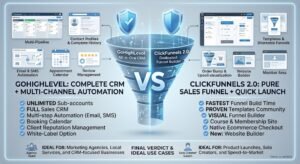
The honest trade-off: HubSpot has more mature reporting and ClickFunnels has a simpler funnel builder for a solo user. GoHighLevel wins for agencies that want to resell the platform, run client sub-accounts, and keep client management under one roof instead of stitching five tools together.
White-Label and SaaS Configurator: Professional Setup for Agencies
For agencies that want to resell GoHighLevel under their own brand, white-label setup and the saas configurator turn it into your own product. Set your own domain, your own app name, your own pricing tiers, and rebilling rules so clients see your brand, not highlevel’s.
This is what growing agencies actually mean by professional setup. It’s the difference between “we use GoHighLevel” and “here’s our platform,” even though the engine underneath is the same. The highlevel support portal has documentation for most of this configuration if you get stuck on a specific setting.
Client Onboarding Checklist (Handoff-Ready)
Once the account is live, client onboarding needs its own short checklist so nothing gets lost in the handoff.
That covers confirming domain authentication passed, testing a full form submission end to end, checking sms and email both fire correctly, walking the client through their calendar, and sending a short launchpad video showing where everything lives. Agencies that want fewer support tickets in week one build this checklist once and reuse it for every client.
Track roi from day one too. A client who can see leads moving through the pipeline and calls getting booked trusts the system a lot faster than one who’s just told it’s working.
Ghl’s real value shows up once you start to optimize instead of just set and forget. Watch which step of the workflow sends emails that actually get opened, adjust the timing, and trim anything that isn’t moving a lead forward. That’s how customer relationships stay warm instead of going cold three weeks after the first message.
Let’s take the busywork off your plate.
Book a free 30-minute call and we’ll map out exactly where automation can save you hours every week — no pressure, no jargon.
Frequently Asked Questions
u003cstrongu003eWhat is GoHighLevel used for?u003c/strongu003e
GoHighLevel is used as an all-in-one CRM and marketing platform, handling funnels, pipelines, calendars, phone and sms, and workflow automation for agencies and the clients they serve.
u003cstrongu003eHow do I set up GoHighLevel for the first time?u003c/strongu003e
Start at the agency level, confirm billing and pricing tiers, create a sub-account, set up domain authentication and a twilio account, then import a snapshot or build your pipeline and workflows from scratch.
u003cstrongu003eIs GoHighLevel good for beginners?u003c/strongu003e
It’s approachable once the account structure makes sense, but the learning curve is steeper than a basic CRM because you’re setting up funnels, automation, and a phone system all at once rather than just a contact list.
u003cstrongu003eWhat’s the difference between a GoHighLevel agency account and a sub-account?u003c/strongu003e
The agency account handles billing, snapshots, and saas configurator settings. A sub-account is the actual client workspace, with its own pipeline, calendar, and phone number.
u003cstrongu003eHow does GoHighLevel saas mode work?u003c/strongu003e
Saas mode lets an agency resell GoHighLevel under its own brand, charging clients a monthly fee for access to their sub-account while the agency manages billing and rebilling on the back end.
u003cstrongu003eDo I need a twilio account to use GoHighLevel?u003c/strongu003e
Yes, phone and sms features run through a connected twilio account. Without it, calendar reminders, missed-call automation, and outbound sms simply won’t send.
u003cstrongu003eWhat is a GoHighLevel snapshot and why does it save setup time?u003c/strongu003e
A snapshot is a saved account template including pipelines, workflows, and funnels that can be imported into a new sub-account, cutting client onboarding from a full day down to under an hour in most cases.
u003cstrongu003eHow do I set up automated appointment reminders in GoHighLevel?u003c/strongu003e
Build a workflow triggered by a booking that sends an sms confirmation immediately, a reminder the day before, and a final reminder an hour before, with an optional voicemail drop if no-shows are still a problem.
u003cstrongu003eIs GoHighLevel better than ClickFunnels or HubSpot?u003c/strongu003e
It depends on the use case. GoHighLevel wins for agencies managing multiple client sub-accounts under white-label, while ClickFunnels suits a solo funnel builder and HubSpot fits larger teams with bigger budgets and heavier reporting needs.
u003cstrongu003eWhat is white-label setup in GoHighLevel?u003c/strongu003e
White-label setup lets an agency rebrand GoHighLevel with its own domain, app name, and pricing, so clients see the agency’s brand instead of GoHighLevel’s, configured through the saas configurator.
u003cstrongu003eHow long does a full GoHighLevel onboarding take?u003c/strongu003e
A manual build from scratch can take a full day per client. A well-built snapshot with account templates ready to import cuts that to under an hour for most standard setups.
u003cstrongu003eCan GoHighLevel automate lead nurturing without manual follow-up?u003c/strongu003e
Yes, a multi-step workflow with automated emails and sms messages, time delays between touches, and tagging based on how a lead responds can run an entire nurture sequence without a person sending anything by hand.
u003cstrongu003eWhat does the GoHighLevel api actually connect to?u003c/strongu003e
The api and webhooks let GoHighLevel talk to outside tools, pulling in form submissions, sending data to external systems, or triggering actions when a native integration inside the platform isn’t quite enough.